> For the complete documentation index, see [llms.txt](https://docs.eesel.ai/llms.txt). Markdown versions of documentation pages are available by appending `.md` to page URLs; this page is available as [Markdown](https://docs.eesel.ai/integrations/knowledge/confluence.md).

# Confluence

Connect Confluence so your agent answers from the spaces and pages you pick, wherever it works, with a link back to the page each answer came from.

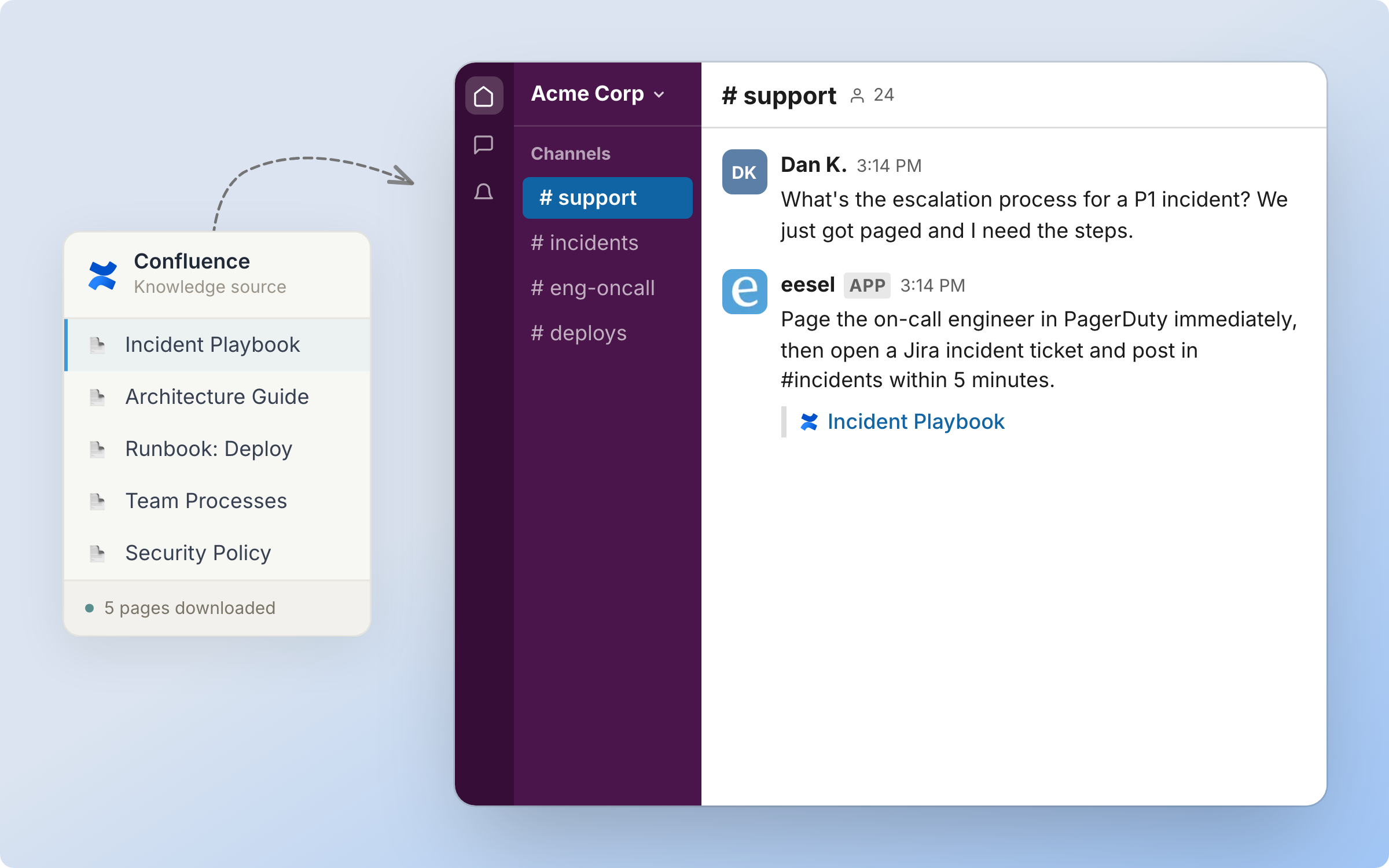
Your AI teammate reads the Confluence spaces and pages you pick, and answers from them wherever it works. Every answer links back to the page it came from.

Nothing runs on its own. Confluence is knowledge only: no triggers and no actions.

<figure><img src="https://3732419023-files.gitbook.io/~/files/v0/b/gitbook-x-prod.appspot.com/o/spaces%2F2xXO0947TYoPIhGoBgSE%2Fuploads%2Fgit-blob-f0d367d04f1791d72360330c7d16cb1f14b6f423%2Fconfluence-hero.png?alt=media" alt="A Confluence knowledge source card listing indexed pages, feeding an agent that answers an escalation question in Slack and cites the source page"><figcaption><p>The Confluence pages you pick become knowledge your agent answers from.</p></figcaption></figure>

## Quick start

{% stepper %}
{% step %}

### Ask your agent to connect Confluence

Open the chat in your dashboard and ask it to add your Confluence pages. It posts a link to the Atlassian Marketplace. A person opens it and installs the eesel app on your Confluence site. Prefer to click? **Integrations** in the left sidebar starts the same connection.

<figure><img src="https://3732419023-files.gitbook.io/~/files/v0/b/gitbook-x-prod.appspot.com/o/spaces%2F2xXO0947TYoPIhGoBgSE%2Fuploads%2Fgit-blob-8079c41d3a2901ed2c8195f1f71efdff4f03836f%2Fconfluence-connect-chat.png?alt=media" alt="The dashboard chat where the user asks to add Confluence pages as knowledge and the agent posts a Connect Confluence link"><figcaption><p>The agent posts the Connect Confluence link.</p></figcaption></figure>

You need a Confluence **Cloud** site and admin rights to install a Marketplace app. The self-serve app does not cover Data Center or Server. We run Data Center syncs for some customers as a managed setup, so get in touch.
{% endstep %}

{% step %}

### Install the app from the Atlassian Marketplace

The link opens the **AI for Confluence Cloud** listing by eesel. Click **Try it free**.

<figure><img src="https://3732419023-files.gitbook.io/~/files/v0/b/gitbook-x-prod.appspot.com/o/spaces%2F2xXO0947TYoPIhGoBgSE%2Fuploads%2Fgit-blob-f27629fefea2cb3e196068d47946c60ec725c5a8%2Fconfluence-marketplace.png?alt=media" alt="The AI for Confluence Cloud listing by eesel on the Atlassian Marketplace, with a Try it free button"><figcaption><p>The AI for Confluence Cloud listing on the Atlassian Marketplace.</p></figcaption></figure>

Pick your Confluence Cloud site and click **Review**.

<figure><img src="https://3732419023-files.gitbook.io/~/files/v0/b/gitbook-x-prod.appspot.com/o/spaces%2F2xXO0947TYoPIhGoBgSE%2Fuploads%2Fgit-blob-9e7b4b65256e6181625d6db76df4839ccd40192a%2Fconfluence-select-site.png?alt=media" alt="Atlassian&#x27;s Select a site step with a Confluence Cloud site chosen and a Review button"><figcaption><p>Atlassian's Select a site step.</p></figcaption></figure>

On **Review and install**, check the **Permissions** section, then click **Start free trial**. Atlassian shows a trial and a monthly price here. That is Atlassian's wording for every Marketplace app. eesel does not charge you for connecting Confluence.

<figure><img src="https://3732419023-files.gitbook.io/~/files/v0/b/gitbook-x-prod.appspot.com/o/spaces%2F2xXO0947TYoPIhGoBgSE%2Fuploads%2Fgit-blob-47394edcccf25290904af5753786bd615c3e1abe%2Fconfluence-review-install.png?alt=media" alt="Atlassian&#x27;s Review and install step showing the app card, a Permissions section, and a Start free trial button"><figcaption><p>Atlassian's Review and install step.</p></figcaption></figure>

A person approves this in the browser.
{% endstep %}

{% step %}

### Open the app in Confluence and pick your pages

Open the eesel AI app inside Confluence, from **Apps** in the Confluence sidebar. On first open it asks you to sign in. Use the same eesel AI account as your dashboard, so both see the same pages.

<figure><img src="https://3732419023-files.gitbook.io/~/files/v0/b/gitbook-x-prod.appspot.com/o/spaces%2F2xXO0947TYoPIhGoBgSE%2Fuploads%2Fgit-blob-dcf331805def0e638766f49e09fa1a66abe47083%2Fconfluence-app-first-open.png?alt=media" alt="The eesel AI app page inside Confluence on first open, asking you to create or sign in to an eesel AI account"><figcaption><p>The eesel AI app inside Confluence on first open.</p></figcaption></figure>

Open **Confluence Sources**. Tick a parent page and everything under it comes along, including child pages you add later. The app only reads pages it is allowed to see. If a space or page is restricted, give the app View permission first.

<figure><img src="https://3732419023-files.gitbook.io/~/files/v0/b/gitbook-x-prod.appspot.com/o/spaces%2F2xXO0947TYoPIhGoBgSE%2Fuploads%2Fgit-blob-3d2531555cf40345b6bb065b20d8a90e4a1ec1c2%2Fconfluence-sources-picker.png?alt=media" alt="The Confluence Sources screen inside the app, showing a tree of spaces and pages with checkboxes and one parent page ticked"><figcaption><p>The page picker inside the app, with one parent page ticked.</p></figcaption></figure>
{% endstep %}

{% step %}

### Confirm the connection

Tell your agent you are done. It reports how many pages it indexed from which space. Pages refresh on their own when you edit them in Confluence, so there is no manual sync to run.

<figure><img src="https://3732419023-files.gitbook.io/~/files/v0/b/gitbook-x-prod.appspot.com/o/spaces%2F2xXO0947TYoPIhGoBgSE%2Fuploads%2Fgit-blob-275186c7bf0a0c3ee20987dcf826984651c41015%2Fconfluence-connected-chat.png?alt=media" alt="The dashboard chat confirming Confluence is connected, with an indexed document count and an offer to test it"><figcaption><p>The chat confirms the connection and reports what it indexed.</p></figcaption></figure>

**Check it worked.** The dashboard shows Confluence as connected with the site name, and a document count next to the Confluence source. From a terminal, `eesel status` lists the integration as connected with its source counts.
{% endstep %}

{% step %}

### Check what it can read

**Integrations > Confluence** shows the connection, your site name, and the Confluence source it reads. The source row has a document count and a toggle. Turn the toggle off to stop your agent using those pages, without disconnecting. The **Start a chat** buttons open a chat about Confluence, one for setup help and one for a question.

<figure><img src="https://3732419023-files.gitbook.io/~/files/v0/b/gitbook-x-prod.appspot.com/o/spaces%2F2xXO0947TYoPIhGoBgSE%2Fuploads%2Fgit-blob-fe2ac400475d0060d463f0489830678b96de41d1%2Fconfluence-integration-page.png?alt=media" alt="The Confluence integration page in the dashboard showing Connected with the site name, Start a chat buttons, and a Confluence source row with a document count and a toggle"><figcaption><p>The Confluence source has its own document count and its own toggle.</p></figcaption></figure>
{% endstep %}

{% step %}

### Tell it how to answer

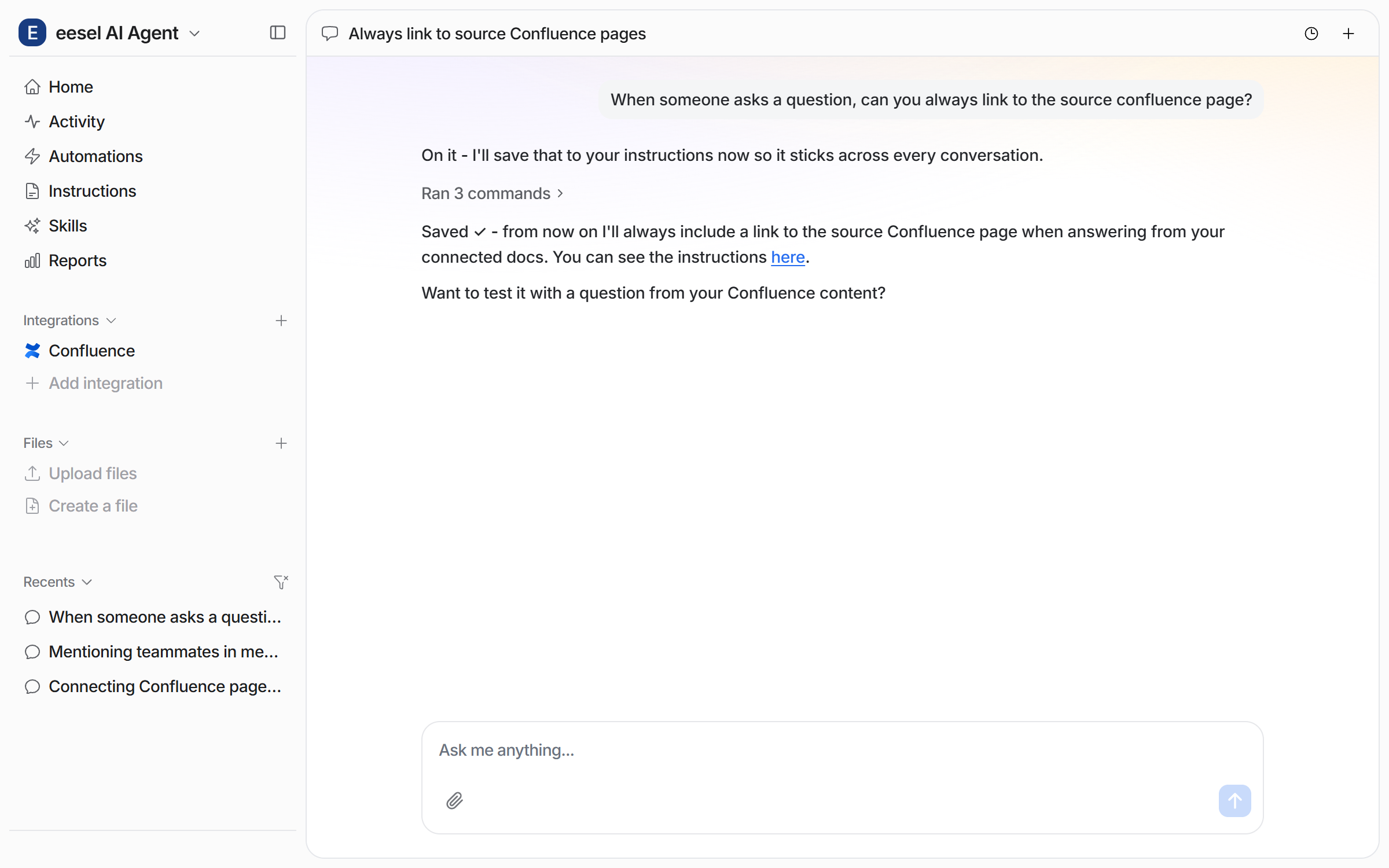
Ask in chat for the answering habits you want, for example to always link the source page. Your agent saves what you ask to its instructions, and applies it to every conversation.

<figure><img src="https://3732419023-files.gitbook.io/~/files/v0/b/gitbook-x-prod.appspot.com/o/spaces%2F2xXO0947TYoPIhGoBgSE%2Fuploads%2Fgit-blob-bbe39e6bfb794c408fefd4449f22093fb0d576ed%2Fconfluence-instruction-chat.png?alt=media" alt="The dashboard chat where the user asks the agent to always link the source Confluence page, and the agent saves it to its instructions"><figcaption><p>Ask in chat for a habit, and your agent saves it to its instructions.</p></figcaption></figure>

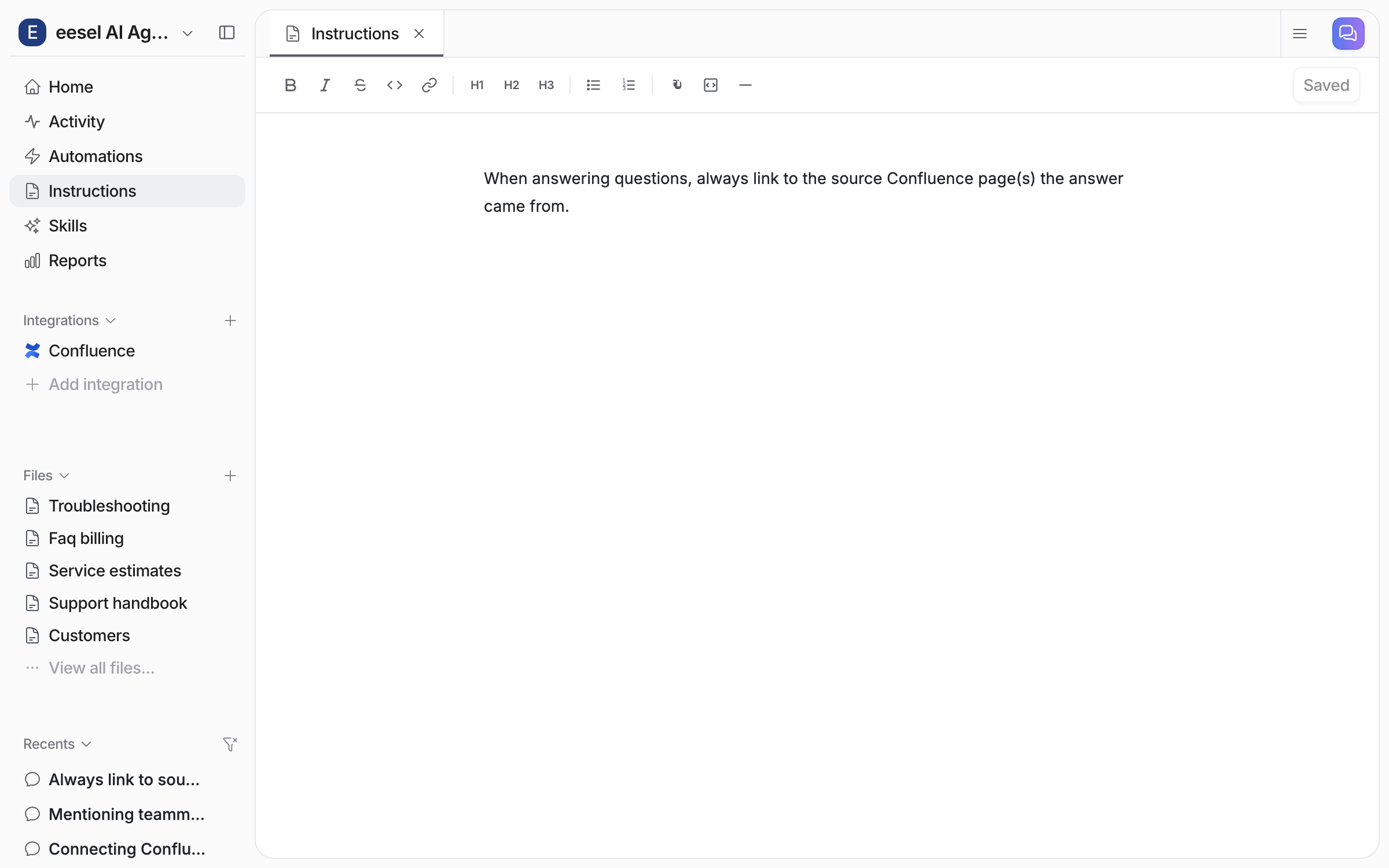
The **Instructions** page holds the saved text, where you can read or edit it.

<figure><img src="https://3732419023-files.gitbook.io/~/files/v0/b/gitbook-x-prod.appspot.com/o/spaces%2F2xXO0947TYoPIhGoBgSE%2Fuploads%2Fgit-blob-0378cc28202939b0fbd9f147c772e37d70d5158b%2Fconfluence-instruction-saved.png?alt=media" alt="The Instructions page in the dashboard, showing the saved instruction text"><figcaption><p>The saved instruction on the Instructions page.</p></figcaption></figure>
{% endstep %}

{% step %}

### Ask it something

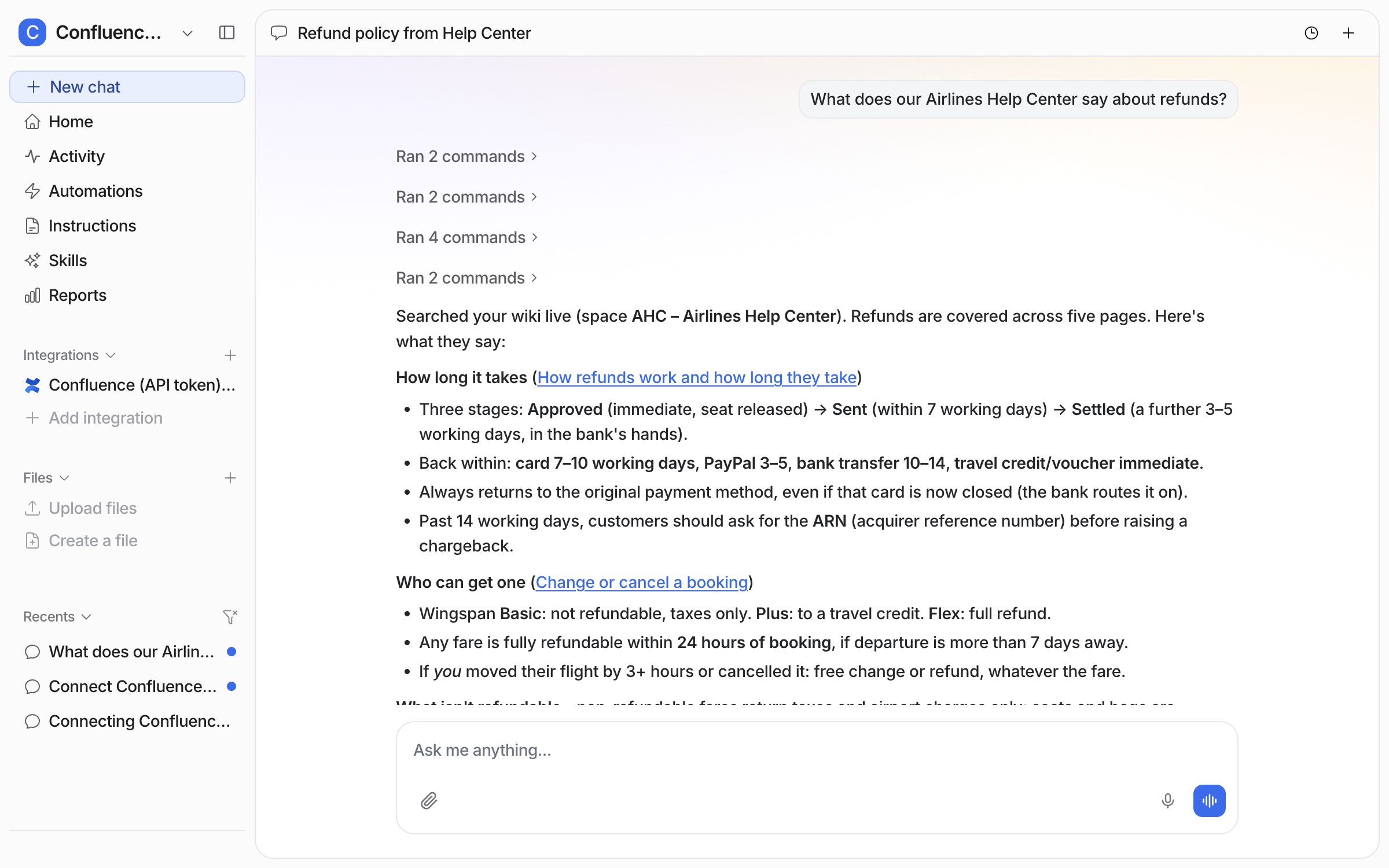
Ask a question your wiki already answers. A **Sources** list under the answer links every page it used.

<figure><img src="https://3732419023-files.gitbook.io/~/files/v0/b/gitbook-x-prod.appspot.com/o/spaces%2F2xXO0947TYoPIhGoBgSE%2Fuploads%2Fgit-blob-a00a71705b8d1cd277b114c34a45dc00635c08ce%2Fconfluence-test-chat.png?alt=media" alt="The dashboard chat answering a question from the indexed Confluence pages, with a Sources list linking each page used"><figcaption><p>The dashboard chat answering from the indexed pages, with a Sources list.</p></figcaption></figure>
{% endstep %}

{% step %}

### Use it where your team works

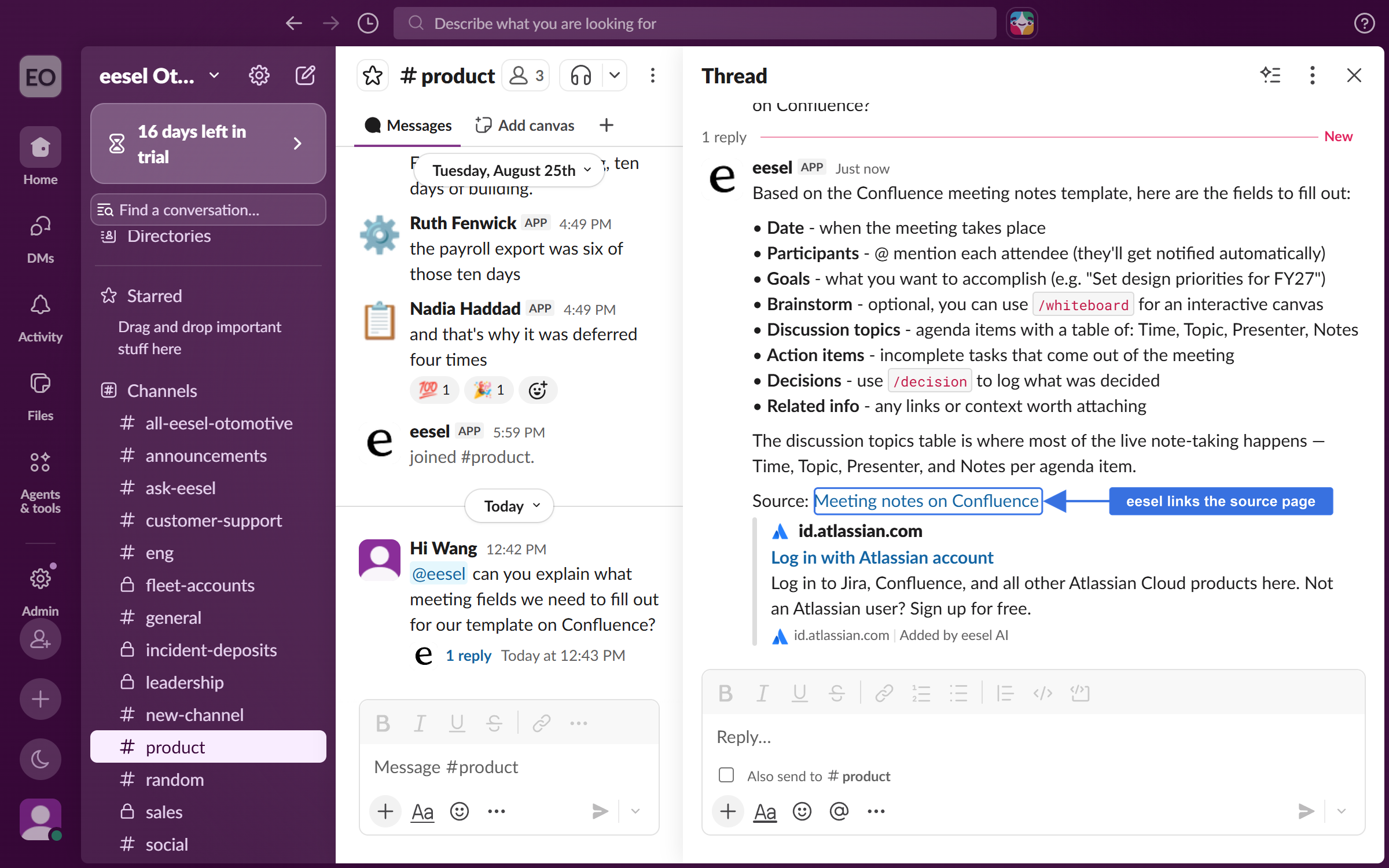
Once [Slack](/integrations/communication/slack.md) is connected too, anyone can @mention the eesel app in a Slack channel and ask. It answers in the thread and links the source page.

<figure><img src="https://3732419023-files.gitbook.io/~/files/v0/b/gitbook-x-prod.appspot.com/o/spaces%2F2xXO0947TYoPIhGoBgSE%2Fuploads%2Fgit-blob-0d825b8e609445c4828a7a9b1e6dc7c8d89d0b30%2Fconfluence-slack-thread.png?alt=media" alt="A Slack channel where a teammate mentions the eesel app with a question, and it answers in the thread and links the source Confluence page"><figcaption><p>A Slack thread answered from Confluence, with the source page linked.</p></figcaption></figure>

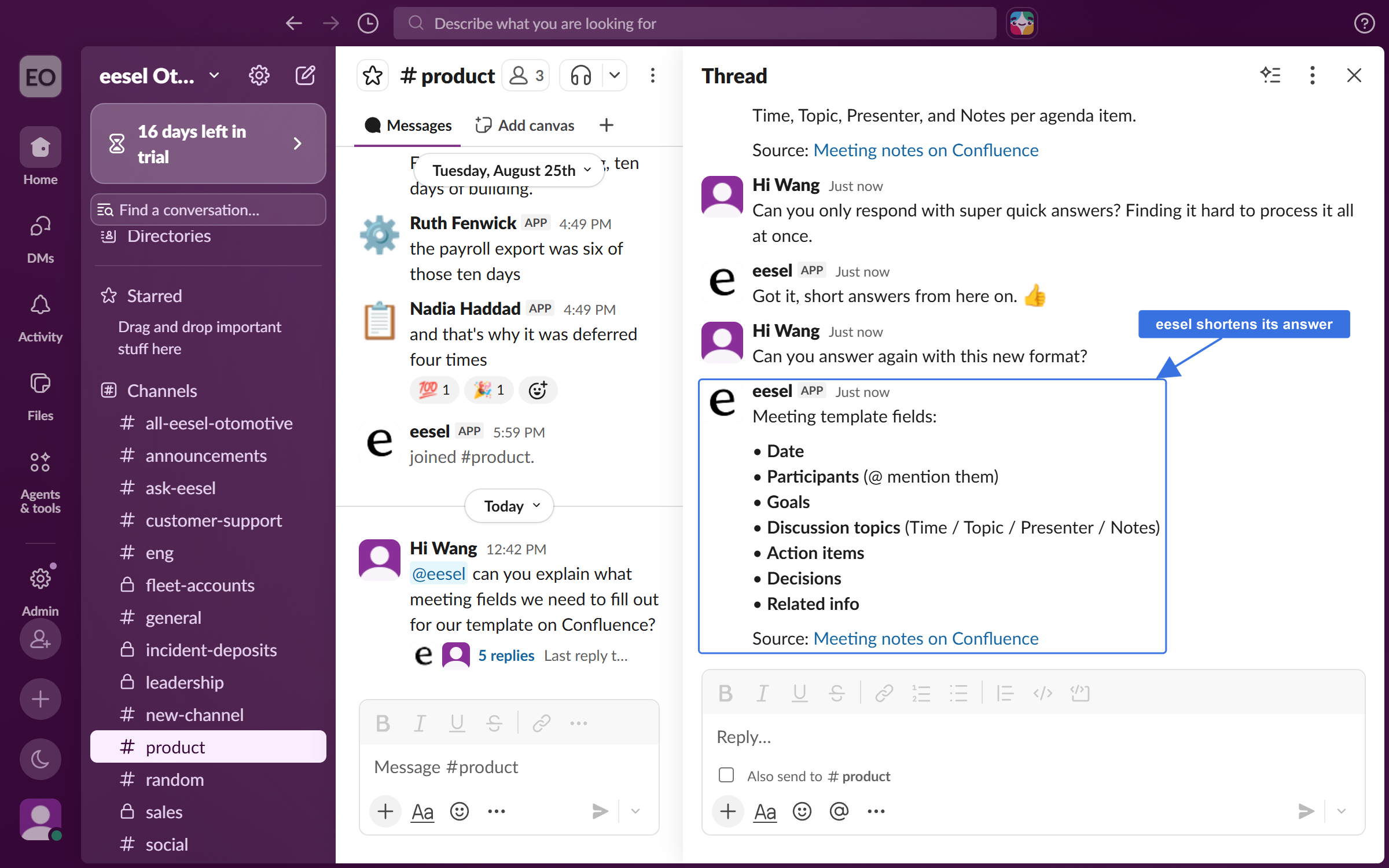
It stays in the thread after that. Ask it to change how it answers, for example to keep answers short. It adjusts and answers again without another mention.

<figure><img src="https://3732419023-files.gitbook.io/~/files/v0/b/gitbook-x-prod.appspot.com/o/spaces%2F2xXO0947TYoPIhGoBgSE%2Fuploads%2Fgit-blob-a201790d8612abee344be7b6fa7410e2aca9bef4%2Fconfluence-slack-followup.png?alt=media" alt="The same Slack thread later, where the teammate asks for shorter answers and the eesel app adjusts and answers again"><figcaption><p>The same thread, where it takes feedback and answers again.</p></figcaption></figure>

The **Chat** tab of the eesel app inside Confluence answers from the same pages, for people who never open the dashboard.

<figure><img src="https://3732419023-files.gitbook.io/~/files/v0/b/gitbook-x-prod.appspot.com/o/spaces%2F2xXO0947TYoPIhGoBgSE%2Fuploads%2Fgit-blob-0d7f3de0dfed11083881651cc6a1acea7e152d48%2Fconfluence-in-app-chat.png?alt=media" alt="The Chat tab of the eesel app inside Confluence, answering a question from the indexed Confluence pages"><figcaption><p>The Chat tab of the eesel app inside Confluence, answering from your Confluence pages.</p></figcaption></figure>
{% endstep %}
{% endstepper %}

## Sources

| Source    | Description                               | Requires                                                       |
| --------- | ----------------------------------------- | -------------------------------------------------------------- |
| **Pages** | The text of the Confluence pages you pick | The Marketplace app installed, and View permission on the page |

**Page attachments are not indexed.** Only the text of the page itself is read. If the content of a PDF or another attachment matters, put it in the page text. Or upload the file to your agent.

**One connection indexes up to 3,000 pages by default.** Past that, indexing stops at the limit rather than failing, and the app tells you the page indexing limit is reached. Email `hi@eesel.app` to have it raised.

**Updates get picked up on their own.** Editing an indexed page re-indexes it. A new page under an indexed parent is picked up for you. About once an hour the app reconciles its index against Confluence. If a page still looks stale after that, re-index it from the app inside Confluence.

Every other integration on your agent is also a source. So one answer can draw on Confluence, Notion, Google Drive, your helpdesk and your files at once. If your team uses Jira, [Jira Service Management](/integrations/helpdesks/jira-service-management.md) pairs well with Confluence. See [Integrations](/integrations/overview.md).

{% hint style="info" %}
**From Claude Code, Cursor or a terminal.** The same setup works as commands: `eesel login`, then `eesel integrations connect confluence`. The connect command prints what the connection needs. A person approves it in the browser: use the link the command returns, or if the receipt comes back held with no link, ask for one with `eesel chat "give me the connect link for confluence"`. Print the link for the person, wait for the connection status to change, and do not retry it. Run `eesel status` to see the integration connected with its source counts. Run `eesel chat` to ask a question. Picking which pages to index has no command, so use the app inside Confluence for that step. Full command reference: [The eesel CLI](/apis-and-developer-resources/cli.md). Step-by-step: [Set up from Claude Code or the terminal](/getting-started/set-up-from-a-coding-agent.md). From an MCP client: [Claude Code and MCP clients](/apis-and-developer-resources/claude-code-and-mcp-clients.md).
{% endhint %}

## Troubleshooting

<details>

<summary>A page is not being indexed?</summary>

Permissions are the cause most of the time. Check them at two levels:

1. **The space.** Open **Space Settings > Space Access** and click **Edit**. Add the eesel AI app to the users list with at least **View** for all content, then save.
2. **The page.** Click the **Restrictions** padlock on the page and confirm the app has View access.

If permissions are fine, check the page's parent. A new page is only picked up when it sits under a page you ticked. Otherwise tick it in the app yourself. Also check you are inside the 3,000 page limit. Very long pages, and pages heavy with tables and embeds, can fail to process. Splitting them usually fixes it.

</details>

<details>

<summary>Answers are out of date?</summary>

Edits normally re-index on their own, and the hourly reconciliation catches the rest, so give it an hour. Confirm the edit was saved in Confluence. If one page is still stale, re-index it from the app inside Confluence.

</details>

<details>

<summary>Installed from the Marketplace, but Confluence is not showing in eesel?</summary>

The Marketplace install puts the app on your Confluence site. It is the sign-in inside the app that links the site to your eesel workspace. Open the eesel AI app from **Apps** in the Confluence sidebar and sign in with the same account as your dashboard. If it is already signed in and Confluence is still missing, it was signed in with a different eesel account: sign out in the app and back in with the right one. A site may also hold an older install of the same app under its earlier name, ChatGPT for Confluence; it works the same way.

</details>

<details>

<summary>Nothing is indexing at all?</summary>

Confirm the app is still installed on your Confluence site. Then confirm at least one page or parent page is ticked in the app. The app indexes nothing until you pick something.

</details>

## FAQ

<details>

<summary>Does connecting Confluence let my agent change anything in my wiki?</summary>

No. The app asks for read-only access, so it can only read the pages you picked. It cannot create, edit, delete or move anything in Confluence.

</details>

<details>

<summary>Do I have to re-sync every time I edit a page?</summary>

No. Editing an indexed page re-indexes it, and the app reconciles its index against Confluence about once an hour.

</details>

<details>

<summary>Can I choose which spaces and pages my agent uses?</summary>

Yes. Pick them in the eesel AI app inside Confluence. Ticking a parent page includes everything under it.

</details>

<details>

<summary>Does it index files attached to pages?</summary>

No, only the text of the page itself. If a file's content matters, put it in the page text. Or upload the file to your agent as its own source.

</details>

<details>

<summary>Does this work with Confluence Data Center or Server?</summary>

Not through the self-serve Marketplace app, which is Cloud only. We do run Data Center syncs for some customers as a managed setup. Get in touch if that is you.

</details>

<details>

<summary>What does it cost to connect Confluence?</summary>

Nothing. The trial and price Atlassian shows during the install are Atlassian's Marketplace wording, not an eesel charge. You are billed for the work your agent does, and a ticket or conversation it handles is one task. See [Pricing](/pricing/overview.md).

</details>

## Related pages

* [Internal operations](/use-cases/internal-operations.md)
* [Integrations overview](/integrations/overview.md)
* [Set up from Claude Code or the terminal](/getting-started/set-up-from-a-coding-agent.md)


---

# Agent Instructions
This documentation is published with GitBook. GitBook is the documentation platform designed so that both humans and AI agents can read, navigate, and reason over technical content effectively. Learn more at gitbook.com.

## Querying This Documentation
If you need additional information that is not directly available in this page, you can query the documentation dynamically by asking a question.

Perform an HTTP GET request on the current page URL with the `ask` query parameter, and the optional `goal` query parameter:

```
GET https://docs.eesel.ai/integrations/knowledge/confluence.md?ask=<question>&goal=<endgoal>
```

`ask` is the immediate question: it should be specific, self-contained, and written in natural language.
`goal` is optional and describes the broader end goal you are ultimately trying to accomplish on behalf of the user. GitBook uses it to tailor the answer towards what is most useful for that goal.

The response will contain a direct answer to the question and relevant excerpts and sources from the documentation.

Use this mechanism when the answer is not explicitly present in the current page, you need clarification or additional context, or you want to retrieve related documentation sections.