> For the complete documentation index, see [llms.txt](https://docs.eesel.ai/llms.txt). Markdown versions of documentation pages are available by appending `.md` to page URLs; this page is available as [Markdown](https://docs.eesel.ai/integrations/communication/microsoft-teams.md).
# Microsoft Teams
Set up an AI agent for Microsoft Teams. The Teams chatbot answers @mentions and direct messages from your knowledge. It is not self-serve yet, so contact us to turn it on.
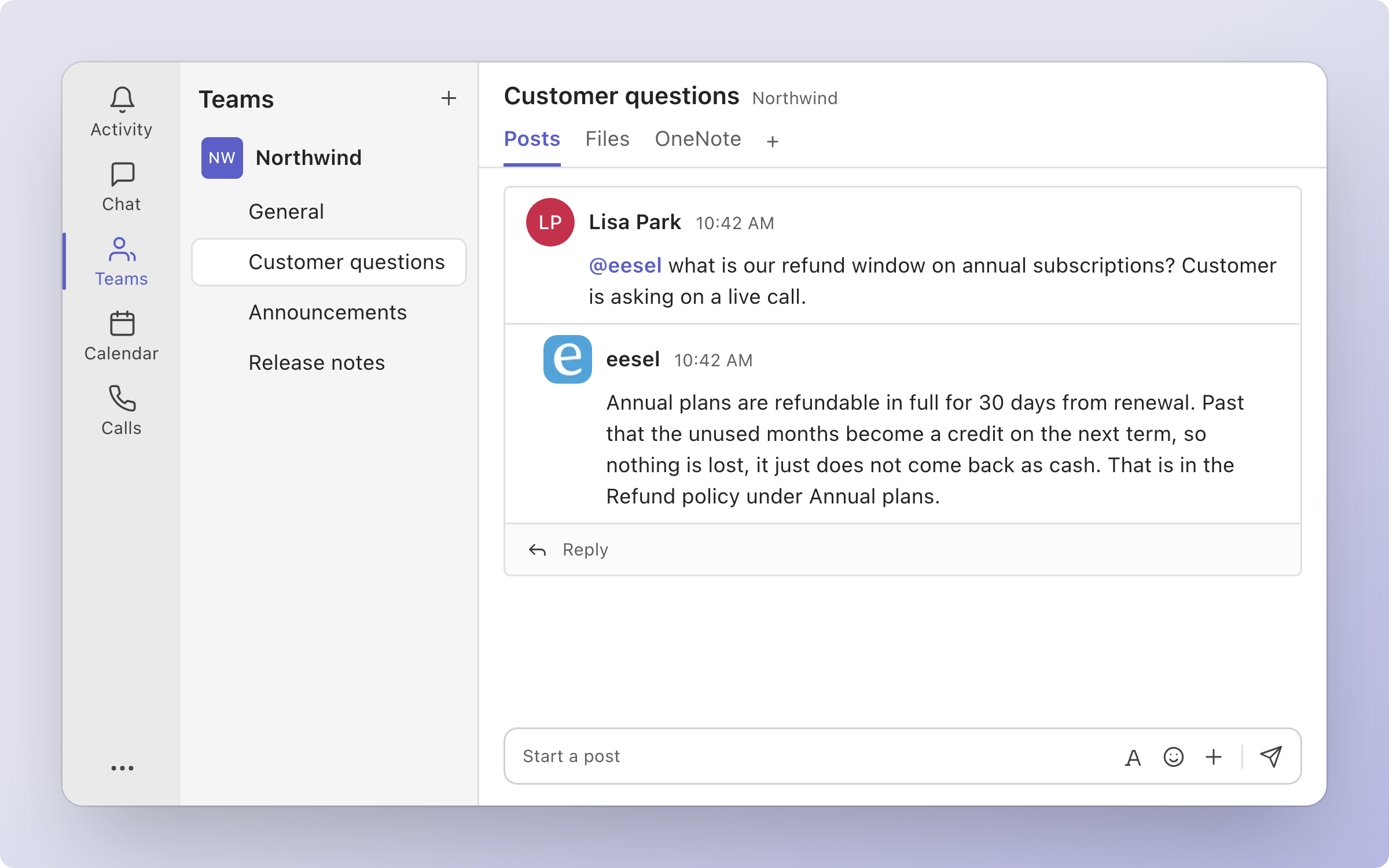
eesel's AI agent for Microsoft Teams is a Teams chatbot your team @mentions in a channel or messages directly, and it answers from the knowledge you have connected. It is not self-serve yet, so [contact us](https://eesel.ai/contact) and we will turn it on for your workspace. Until then, most teams get the same workflow through [Slack](/integrations/communication/slack.md). It is not Microsoft Copilot, Microsoft's own AI assistant in Teams.
Your agent answers in the Teams channel your team already uses, from the knowledge you have connected.
## Set up eesel in Microsoft Teams
Microsoft Teams is not self-serve yet. [Contact us](https://eesel.ai/contact) and we will turn it on for your workspace. Once it is on, setup takes three steps, because eesel is not yet listed in the Microsoft Teams store:
1. **Download the Teams package.** On the Microsoft Teams page under **Integrations**, download the eesel package.
2. **A Teams admin uploads it.** In the Teams admin center, go to **Teams apps > Manage apps > Upload new app**. Microsoft allows this with no approval, and the app shows up for your organization within a few hours.
3. **Add eesel in Teams.** In Teams, go to **Apps** in the left sidebar, search for eesel and click **Add**. eesel then messages you in Teams with a link to pick which agent should answer.
After that, add the eesel app to the teams and channels where your people ask questions. A person has to add it, since it cannot join a team on its own.
## What your agent does in Teams
**It answers when it is asked.** @mention eesel in a channel it has been added to, or send it a direct message. It answers in the thread that asked, from your connected knowledge.
**It sees only what was said to it.** eesel does not read a channel's history. It keeps its own record of each conversation: the messages that mentioned it, plus its replies.
| Trigger | Fires when | Key |
| ------------------------------------- | ------------------------------------------------------------------ | --------------------------------- |
| **When @eesel is mentioned in Teams** | Someone @mentions eesel in a channel, or sends it a direct message | `microsoft_teams_eesel_mentioned` |
| Action | What it does |
| --------------------- | -------------------------------------------------------------- |
| **Send Message** | Sends a message to a Teams conversation, a thread, or a person |
| **Look up person** | Finds someone in a Teams conversation by name or email |
| **List channels** | Lists the channels of the team the conversation came from |
| **Read conversation** | Reads eesel's own record of a Teams conversation |
You stay in control the whole way. Adjust your AI agent's access to knowledge and its action permissions to your liking. See [Actions and Approvals](/instructions-and-memory/actions-and-approvals.md).
## Limitations
* **Not self-serve yet.** Contact us to turn Microsoft Teams on for your workspace.
* **A Teams admin has to upload the app.** It can take a few hours after the upload before eesel appears in Teams.
* **No channel history.** It only sees messages that mention it, plus its own replies.
* **No organization-wide directory search.** Looking someone up only covers the people in the conversation.
* **It only works where it has been added.** A person adds the app to a team.
## FAQ
How do I add an AI agent to Microsoft Teams?
[Contact us](https://eesel.ai/contact) to turn Microsoft Teams on for your workspace. Once it is on, a Teams admin uploads the eesel package in the Teams admin center, then you add eesel from **Apps** in Teams and pick your agent from the link it sends you. The steps are in [Set up eesel in Microsoft Teams](#set-up-eesel-in-microsoft-teams).
Is the Microsoft Teams AI agent available to everyone?
Not yet. It is not self-serve, so [contact us](https://eesel.ai/contact) and we will turn it on for your workspace. [Slack](/integrations/communication/slack.md) gives the same workflow today, self-serve.
Can the Microsoft Teams AI agent auto reply to messages?
Yes, when it is asked. It replies whenever someone @mentions it in a channel it has been added to, or sends it a direct message. It does not reply to channel messages that do not mention it.
Can I connect Microsoft Teams to ChatGPT or Claude?
Yes, through eesel. You can talk to the same eesel agent from ChatGPT, Claude or Cursor. See [Use eesel from ChatGPT](/apis-and-developer-resources/use-eesel-from-chatgpt.md), [Use eesel from Claude and other assistants](/apis-and-developer-resources/use-eesel-from-claude-and-other-assistants.md) and [Claude Code and MCP clients](/apis-and-developer-resources/claude-code-and-mcp-clients.md).
Does the Microsoft Teams AI agent read our channel history?
No. It only sees the messages that mention it, plus its own replies. Anything said in a channel without mentioning eesel is not available to it.
How long does Microsoft Teams setup take?
Mostly the wait for Microsoft. After a Teams admin uploads the eesel package, it can take a few hours before the app appears for your organization. Adding it in Teams and picking your agent then takes a couple of clicks.
## Related pages
* [Slack](/integrations/communication/slack.md) for the same workflow, available self-serve today
* [Internal operations](/use-cases/internal-operations.md) for the job your agent does for your team
* [Actions and Approvals](/instructions-and-memory/actions-and-approvals.md) for choosing what your agent may do
* [Integrations overview](/integrations/overview.md) for how sources, triggers and actions fit together
---
# Agent Instructions
This documentation is published with GitBook. GitBook is the documentation platform designed so that both humans and AI agents can read, navigate, and reason over technical content effectively. Learn more at gitbook.com.
## Querying This Documentation
If you need additional information that is not directly available in this page, you can query the documentation dynamically by asking a question.
Perform an HTTP GET request on the following URL with the `ask` and `goal` query parameters:
```
GET https://docs.eesel.ai/integrations/communication/microsoft-teams.md?ask=&goal=
```
`ask` is the immediate question: it should be specific, self-contained, and written in natural language.
`goal` is what the user is ultimately trying to achieve, the reason they need the answer. Sharing it helps GitBook give you a better, more relevant answer. A goal is most helpful when it describes the outcome the user wants rather than restating the question. For example, with `ask=how do I create an API token`, a goal like `build a script that syncs our docs to a CMS` lets GitBook tailor the answer to that use case.
The response will contain a direct answer to the question and relevant excerpts and sources from the documentation.
Use this mechanism when the answer is not explicitly present in the current page, you need clarification or additional context, or you want to retrieve related documentation sections.