> For the complete documentation index, see [llms.txt](https://docs.eesel.ai/llms.txt). Markdown versions of documentation pages are available by appending `.md` to page URLs; this page is available as [Markdown](https://docs.eesel.ai/integrations/overview.md).
# Overview
AI agent integrations in eesel: connect your helpdesk, chat, knowledge and store apps, and see how sources, triggers and actions decide what your agent does.
An integration connects your eesel AI agent to one of the tools you already use, so it can read what that tool holds, wake up on its events, and act inside it.
An integration is how your teammate reaches one of your tools. Connect Zendesk and it can read your help center and answer tickets. Connect Confluence and it can answer from your wiki. Connect Shopify and it can look up a real order.
The useful thing to understand is that every integration is built from the same three parts. Once you've set one up, you've effectively learned them all.
For AI agents and scripts
If you are an AI agent setting eesel up on someone's behalf, do not drive the dashboard in a browser. Use one of these instead, in this order:
1. **MCP.** If your client supports MCP, connect to eesel's MCP server and use its tools to chat, connect integrations and manage automations. See [Claude Code and MCP clients](/apis-and-developer-resources/claude-code-and-mcp-clients.md).
2. **CLI.** Otherwise use the eesel CLI. `eesel login`, `eesel integrations connect `, `eesel integrations download start`, `eesel automations`. See [The eesel CLI](/apis-and-developer-resources/cli.md) and [Set up from Claude Code or the terminal](/getting-started/set-up-from-a-coding-agent.md).
3. **A person for the sign-in.** A full connection needs a person to approve it in the tool itself. If the connect command returns a link, print it for them. If it returns a held receipt with no link, ask for one: `eesel chat "give me the connect link for "`. Either way, do not retry it, and check `eesel status` until the integration shows as connected.
Trigger keys are listed in a Key column on each integration page. Every page states what "connected" and "automation running" look like, so you can check your work.
## Sources, triggers and actions
| | What it is | Examples |
| ------------ | -------------------------------------------------------------- | -------------------------------------------------------------- |
| **Sources** | What your teammate can **read**. The knowledge it answers from | Help center articles, past tickets, macros, wiki pages, files |
| **Triggers** | When your teammate **wakes up**. The events it can act on | A customer messages, a ticket is opened, someone @mentions it |
| **Actions** | What your teammate can **do** in the tool | Draft a reply, tag a ticket, look up an order, create an issue |
Every integration is a mix of these three, and the mix differs. Some are all three: Zendesk gives you knowledge, events to act on, and things to do. Some are sources only, like Confluence, Notion and Google Drive, which your teammate reads but doesn't act in. A few are actions only, where there's nothing to learn but something to do.
Each integration's page in these docs lists exactly what it offers, so you can check before you connect.
{% hint style="info" %}
**Everything pools together.** Sources aren't walled off per integration. An agent with Zendesk, Confluence and your website connected searches all of them at once, so a single ticket reply can draw on your help center, your internal wiki and your marketing site together.
{% endhint %}
## Connecting one
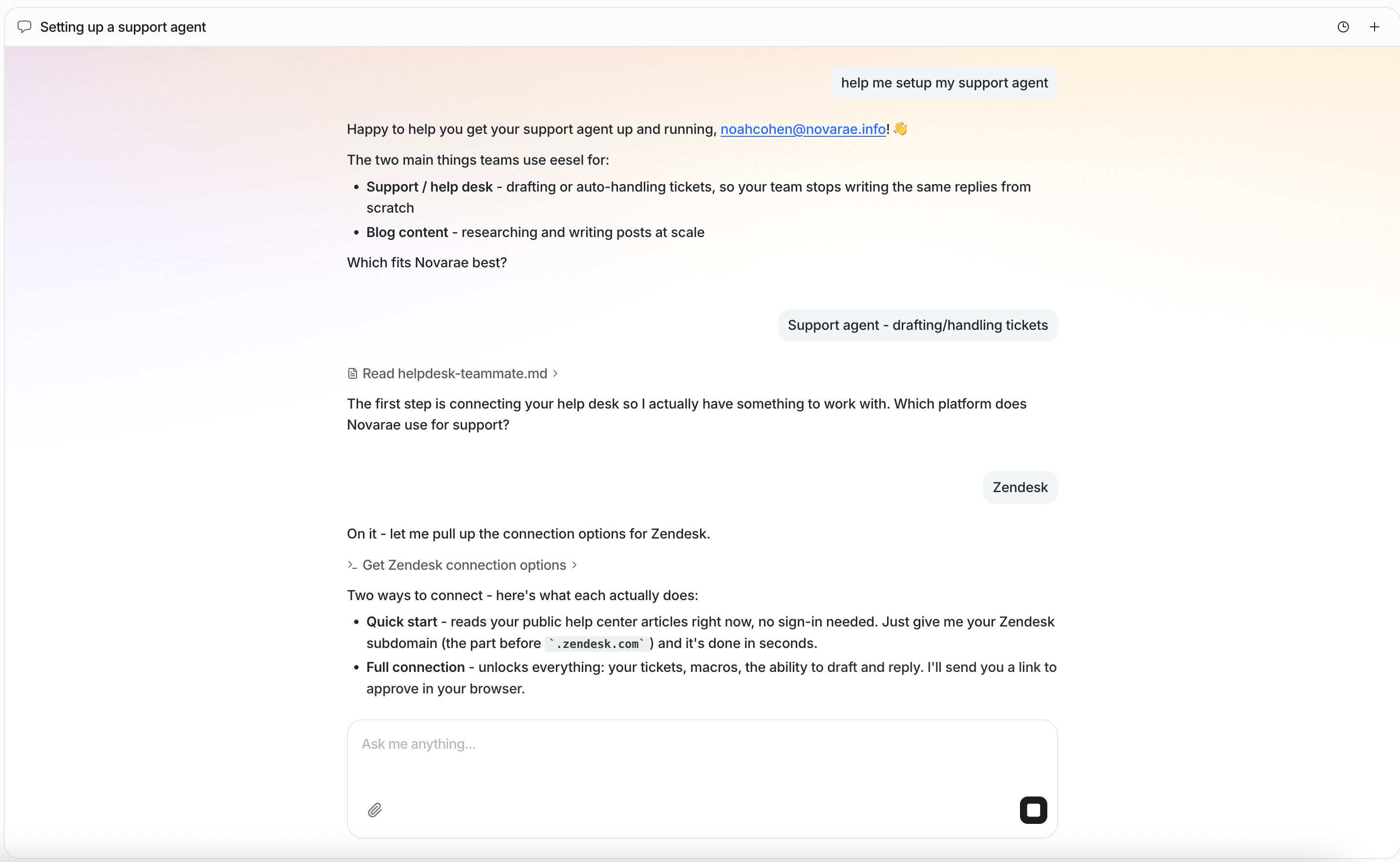
The simplest way is to ask. Open your agent's chat and tell it what you use:
> "Connect my Zendesk"
It walks you through it, asks for whatever it needs, and confirms when it's done.
Ask, and your teammate pulls up the connection options and walks you through them.
Most integrations offer two ways in:
* **A quick start**, which reads your public content without a sign-in. Fast, and useful for trying things out
* **A full connection**, which signs in properly and unlocks past tickets, triggers and actions
You can start with a quick start and upgrade later without losing anything.
If you'd rather click through it yourself, open **Integrations** in the left sidebar of your dashboard and add it there. Same options either way.
{% hint style="warning" %}
**Connecting a tool does not make your teammate start acting.** It only gives it access. Nothing happens on its own until you turn on a trigger, which you do by creating an [automation](/automations-and-schedules/automations-and-schedules.md). So you can connect everything you use, test privately in chat, and go live when you're ready.
{% endhint %}
## Control and uninstalling
Each integration has its own page in your dashboard listing its sources, triggers and actions, and changes save as you make them.
You stay in control the whole way. Adjust your AI agent's access to knowledge and its action permissions to your liking. See [Actions and Approvals](/instructions-and-memory/actions-and-approvals.md).
| | What it means |
| ---------------------------- | ---------------------------------------------------------------------------------------- |
| **Uninstall from agent** | Removes the integration from this agent only. The connection stays for your other agents |
| **Uninstall from workspace** | Removes the connection entirely, for every agent |
To uninstall, click the integration under **Integrations** in the left sidebar, then the **three dots** at the top right. Or ask in chat: tell your teammate what to change or remove, and it handles it.
{% hint style="warning" %}
Uninstalling from the workspace removes the knowledge that came from it, so anything your agents learned from that tool goes with it. If you only want to stop one agent using it, uninstall from that agent instead.
{% endhint %}
## Integration categories
| Category | What your agent does there | Apps |
| ------------------------------------------------------------- | ------------------------------------------------------------------------------------- | --------------------------------------------------------------------------------------------------------------------------- |
| [**Helpdesks**](/integrations/helpdesks.md) | Works your ticket queue: drafts or sends replies, adds notes, tags and routes tickets | Zendesk, Freshdesk, Intercom, HubSpot, Gorgias, Help Scout, Front, Salesforce, Jira Service Management, Zoho Desk, Re:amaze |
| [**Channels**](/integrations/chat-surfaces.md) | Chats with your customers in real time | Chat Bubble, Inline Embed, Public Chat Link, Zendesk Messenger, Fresh Chat |
| [**Communication**](/integrations/communication.md) | Answers your team and customers where they message | Slack, Google Chat, Gmail, Email, Microsoft Teams, Calendly |
| [**Knowledge**](/integrations/knowledge.md) | Reads what your team has written down, so it answers from it | Website, Google Drive, Notion, Confluence, uploaded files |
| [**E-commerce**](/integrations/e-commerce.md) | Looks up real orders, products and stock | Shopify, Magento |
| [**Project Management**](/integrations/project-management.md) | Reads and updates your team's work | Asana |
## What you can connect
The full integration list lives in your dashboard, under **Integrations** in the left sidebar. Ask your agent whether you can connect something and it walks you through it: natively if there's an out-of-the-box integration, or through your app's API with [Network Access](/apis-and-developer-resources/network-access.md) if there is not.
Some integrations need switching on for your workspace before you can use them. If you can't see one you need, ask us in the support chat under **Help and support**.
## FAQ
Which tools can I connect to my eesel AI agent?
You can connect helpdesks, live chat, team chat, email, knowledge sources and e-commerce stores, and anything else with an API through [Network Access](/apis-and-developer-resources/network-access.md). That covers helpdesks (Zendesk, Freshdesk, Intercom, Gorgias, Front, Help Scout, HubSpot, [Zoho Desk](/integrations/helpdesks/zoho-desk.md), [Re:amaze](/integrations/helpdesks/reamaze.md), [Jira Service Management](/integrations/helpdesks/jira-service-management.md)), live chat (Zendesk Messenger, Fresh Chat, eesel's own chat bubble), team chat (Slack, [Google Chat](/integrations/communication/google-chat.md), Microsoft Teams), email (every agent has its own inbox address at @inbox.eesel.ai, so you can forward mail to it), knowledge (Confluence, Notion, Google Drive, [Slite](/integrations/knowledge/slite.md), your website, uploaded files), e-commerce (Shopify, Magento, BigCommerce, [WooCommerce](/integrations/e-commerce/woocommerce.md), [Stripe](/integrations/e-commerce/stripe.md), [Recharge](/integrations/e-commerce/recharge.md), [AfterShip](/integrations/e-commerce/aftership.md), [QuickBooks](/integrations/e-commerce/quickbooks.md)), plus Salesforce, Asana, Gmail and [Calendly](/integrations/communication/calendly.md). Most have their own page in these docs.
How do I connect an integration to my eesel AI agent?
Ask your agent in the dashboard chat, for example "Connect my Zendesk", and it walks you through it. You can also open **Integrations** in the left sidebar and add it there. Either way, a full connection needs a person to approve it once in the tool itself.
What happens when I connect an integration to eesel?
eesel reads what the tool holds, such as your help center, past tickets, macros or orders, so your agent can answer from it, and nothing changes inside the tool. No automation is turned on, no reply is sent, and whatever you already run there keeps running as before. Your agent only starts acting when you turn on an [automation](/automations-and-schedules/automations-and-schedules.md), and it only uses the actions you let it use.
How do I turn a single eesel integration action on or off?
Open the integration's page in your dashboard and change the action there. Changes save as you make them, and you can ask your teammate to change these in chat too. See [Actions and Approvals](/instructions-and-memory/actions-and-approvals.md).
How do I uninstall an eesel integration?
Click the integration under **Integrations** in the left sidebar, then the **three dots** at the top right. **Uninstall from agent** removes it from that agent only and keeps the connection for your other agents. **Uninstall from workspace** removes it entirely. Or tell your teammate in chat which one you want.
## Related
* [Automations and Schedules](/automations-and-schedules/automations-and-schedules.md) to turn triggers on and decide what your teammate does with them
* [Instructions and Memory](/instructions-and-memory/instructions-and-memory.md) to tell it when to use the actions you've enabled
* [Skills](/skills/skills.md) for workflows that run on top of the day-to-day work
* [Use eesel from Claude and other assistants](/apis-and-developer-resources/use-eesel-from-claude-and-other-assistants.md) and [Use eesel from ChatGPT](/apis-and-developer-resources/use-eesel-from-chatgpt.md) to work with your agent from an AI assistant
---
# Agent Instructions
This documentation is published with GitBook. GitBook is the documentation platform designed so that both humans and AI agents can read, navigate, and reason over technical content effectively. Learn more at gitbook.com.
## Querying This Documentation
If you need additional information that is not directly available in this page, you can query the documentation dynamically by asking a question.
Perform an HTTP GET request on the current page URL with the `ask` query parameter, and the optional `goal` query parameter:
```
GET https://docs.eesel.ai/integrations/overview.md?ask=&goal=
```
`ask` is the immediate question: it should be specific, self-contained, and written in natural language.
`goal` is optional and describes the broader end goal you are ultimately trying to accomplish on behalf of the user. GitBook uses it to tailor the answer towards what is most useful for that goal.
The response will contain a direct answer to the question and relevant excerpts and sources from the documentation.
Use this mechanism when the answer is not explicitly present in the current page, you need clarification or additional context, or you want to retrieve related documentation sections.