> For the complete documentation index, see [llms.txt](https://docs.eesel.ai/llms.txt). Markdown versions of documentation pages are available by appending `.md` to page URLs; this page is available as [Markdown](https://docs.eesel.ai/pricing/overview.md).

# Overview

You pay for the work your teammate actually does. No per-seat fees, no monthly minimum, and no limit on how many integrations you connect or agents you run.

## Plans

| Plan                         | What it is                                                                                                                                                                           |
| ---------------------------- | ------------------------------------------------------------------------------------------------------------------------------------------------------------------------------------ |
| **Pay as you go**            | The default. You're billed for the tasks your agents handle, with no platform fee, no monthly minimum and no commitment. Nothing to choose, this is how you start                    |
| **Annual commitment**        | Commit to a year of usage and pay upfront for up to **25% off**. If you go over your commitment, the extra is billed at the normal rate. Arranged with our team                      |
| **Enterprise, $1,000/month** | A flat platform fee on top of usage. Includes a dedicated solutions engineer and account manager, higher knowledge base limits, SSO, HIPAA, BAA, and signed cloud service agreements |

Whichever you're on, you can **cap your monthly spend** so your agents never charge beyond a figure you set. The default cap is $250 and you can change it any time. More on that in [controlling what you spend](#controlling-what-you-spend).

{% hint style="info" %}
There's a **cost calculator** on our [pricing page](https://eesel.ai/pricing) if you want to estimate a bill from your own ticket volume. It's also where you can start a conversation about an annual commitment or Enterprise.
{% endhint %}

## Tasks and costs

A task is the whole interaction, not each message inside it. A support ticket is one task however many replies happen on it, a chat session is one task however many messages go back and forth, and a blog post is one heavy task per run. You're never charged per message, per reply, or per revision.

Work is grouped into three kinds:

| Task type   | Examples                            | Price      |
| ----------- | ----------------------------------- | ---------- |
| **Light**   | Dashboard questions, simple lookups | Free       |
| **Regular** | Support ticket, chat session        | $0.40 each |
| **Heavy**   | Blog post drafts                    | $4.00 each |

## Free trial

Sign up and you get **$50 of free usage plus 2 free blog generations**, every feature unlocked, no credit card needed. The trial ends when the $50 runs out or the trial period is up, whichever comes first, and your agents pause. To carry on, add a card in **Workspace settings > Billing & Usage** (click your workspace name at the top left).

{% hint style="success" %}
**Trial over but not ready to go live?** Adding a card doesn't mean you start paying. Dashboard questions are light tasks and always free, so with a card on file you can keep testing your teammate in the dashboard chat at no charge, for as long as you need.

You only start being billed when it does real work on real conversations, which is when you turn on an [automation](/automations-and-schedules/automations-and-schedules.md).
{% endhint %}

## Controlling what you spend

Cap your monthly spend and your agents pause automatically at the limit, so there are no surprise charges. The default is **$250**, you can change it any time, and you get email alerts at 50%, 75% and 100% on the way there.

The bigger lever is deciding what reaches your teammate in the first place, and that's done with [automations](/automations-and-schedules/automations-and-schedules.md) rather than billing settings.

* **Choose your trigger carefully.** An automation on every customer message will pick up more work than one on first messages only.
* **Filter inside the automation.** Describe the conversations you want handled and your agent skips the rest, so you're not paying for tickets you never wanted it to touch.
* **Roll out gradually.** Route one queue, one brand or one topic first. Anything outside it stays with your team and costs nothing.

This is also how most teams start: a narrow filter, a look at the results, then widen it.

## Where to find your billing

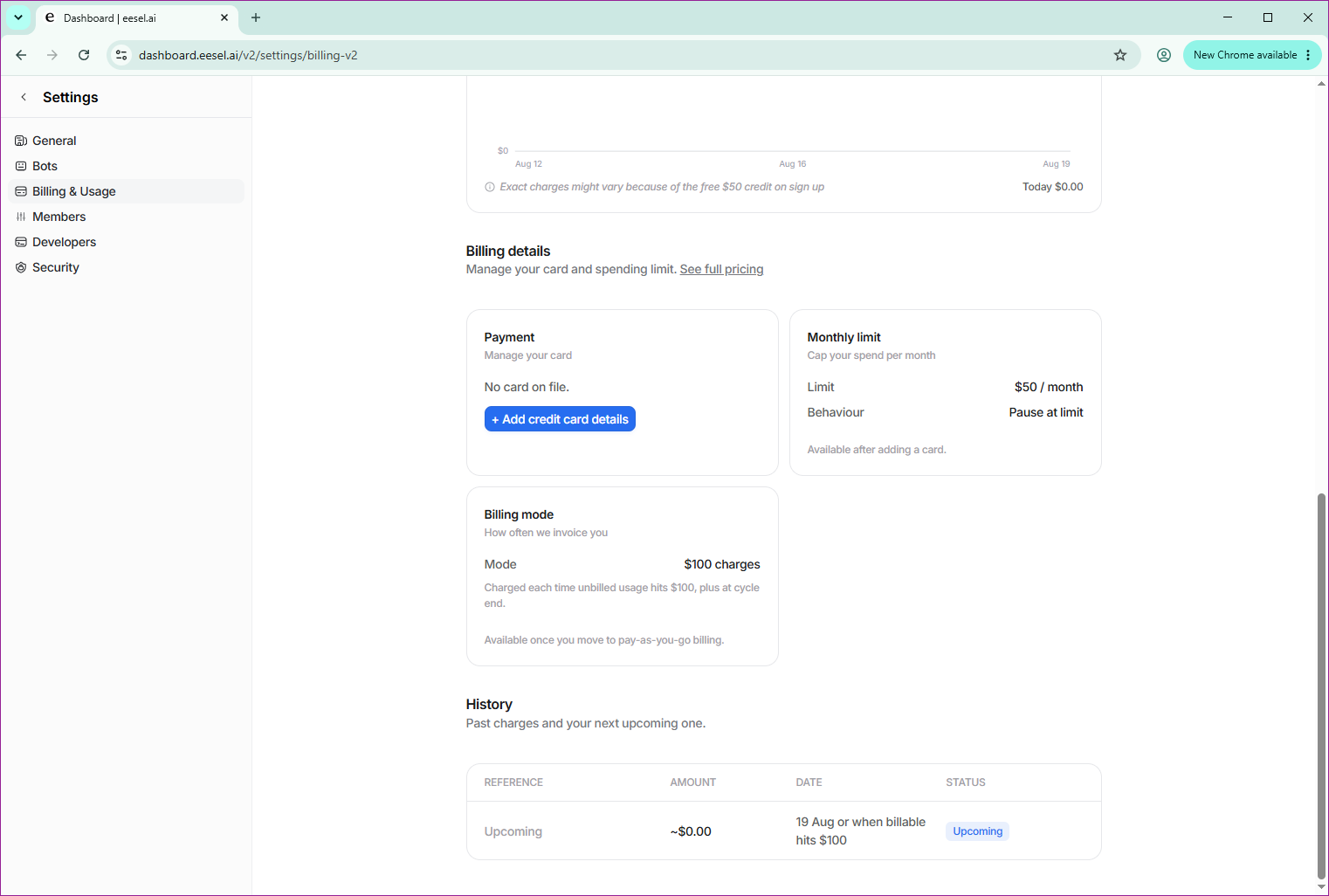
Everything lives in your workspace settings. Click your **workspace name at the top left**, open **Workspace settings**, then **Billing & Usage**.

<figure><img src="/files/9gfnEj2x0GY8RPIRY6pv" alt="The Billing and Usage page in workspace settings, showing a usage chart, payment card details, a monthly limit with pause-at-limit behaviour, billing mode, and a history of past and upcoming charges"><figcaption><p>Workspace settings, Billing and Usage. Your usage over time, your card, your monthly cap, and your charge history in one place.</p></figcaption></figure>

One thing worth knowing: you need a card on file before the monthly limit and billing mode become editable.

### Invoices, receipts and cancelling

Billing runs through **Stripe**, which handles invoicing automatically. An invoice is generated each cycle based on your usage.

Manage your subscription through Stripe from the same Billing & Usage page. That's where you go to pull past invoices and receipts, review your usage history, update payment details, or cancel. There's no lock-in and no cancellation fee.

### Digging into what you were charged for

If a bill looks higher than expected, **Activity** in the left sidebar lists every task your agent has run, filterable by task type and date. Or just ask your teammate: it can tell you what it's been working on. See [Reports](/reports/reports.md).

## FAQ

<details>

<summary>Do I still pay in slow months?</summary>

You only pay for what your AI does. Low volume means a low bill, and if your agents don't handle any tasks, you don't pay anything. No platform fee and no monthly minimum.

</details>

<details>

<summary>Do I pay for tasks that go wrong?</summary>

AI resources are used on every task, whether the result is perfect or not, so tasks are billed regardless of outcome.

If you're seeing repeated issues or charges that don't look right, contact our support team from the in-app chat under **Help and support**. We'll help troubleshoot and make it right.

</details>

<details>

<summary>Can I run multiple agents on one account?</summary>

Yes. Helpdesk agents, blog writers and e-commerce agents all run under one account, each with its own knowledge and instructions. You're billed on the tasks they run, not on how many agents you have.

</details>

<details>

<summary>Do I need a credit card to start?</summary>

No. Sign up and use your trial without entering payment details. You only add a card when you've used your $50 and want to continue.

</details>

<details>

<summary>What happens if I hit my usage limit?</summary>

Your agents stop running and you're never charged beyond the limit you set. Raise the limit in Billing & Usage to resume. Work already in progress finishes; new work doesn't start.

</details>

<details>

<summary>Can I cancel anytime?</summary>

Yes. Go to **Workspace settings > Billing & Usage** and manage your subscription through Stripe. No lock-in, no cancellation fees.

</details>


---

# Agent Instructions
This documentation is published with GitBook. GitBook is the documentation platform designed so that both humans and AI agents can read, navigate, and reason over technical content effectively. Learn more at gitbook.com.

## Querying This Documentation
If you need additional information that is not directly available in this page, you can query the documentation dynamically by asking a question.

Perform an HTTP GET request on the current page URL with the `ask` query parameter, and the optional `goal` query parameter:

```
GET https://docs.eesel.ai/pricing/overview.md?ask=<question>&goal=<endgoal>
```

`ask` is the immediate question: it should be specific, self-contained, and written in natural language.
`goal` is optional and describes the broader end goal you are ultimately trying to accomplish on behalf of the user. GitBook uses it to tailor the answer towards what is most useful for that goal.

The response will contain a direct answer to the question and relevant excerpts and sources from the documentation.

Use this mechanism when the answer is not explicitly present in the current page, you need clarification or additional context, or you want to retrieve related documentation sections.
