> For the complete documentation index, see [llms.txt](https://docs.eesel.ai/llms.txt). Markdown versions of documentation pages are available by appending `.md` to page URLs; this page is available as [Markdown](https://docs.eesel.ai/reports/reports.md).

# Reports

See how much your agent handled, how good its answers were and where it got stuck, and ask it for a written performance review on demand or on a schedule.

Your AI teammate keeps its own numbers: how much it handled, how good the answers were, where it got stuck.

Ask it in the chat. It reads its own figures, explains them, and can write a fuller report on the spot. Or read the charts yourself on the **Reports** page in the left sidebar.

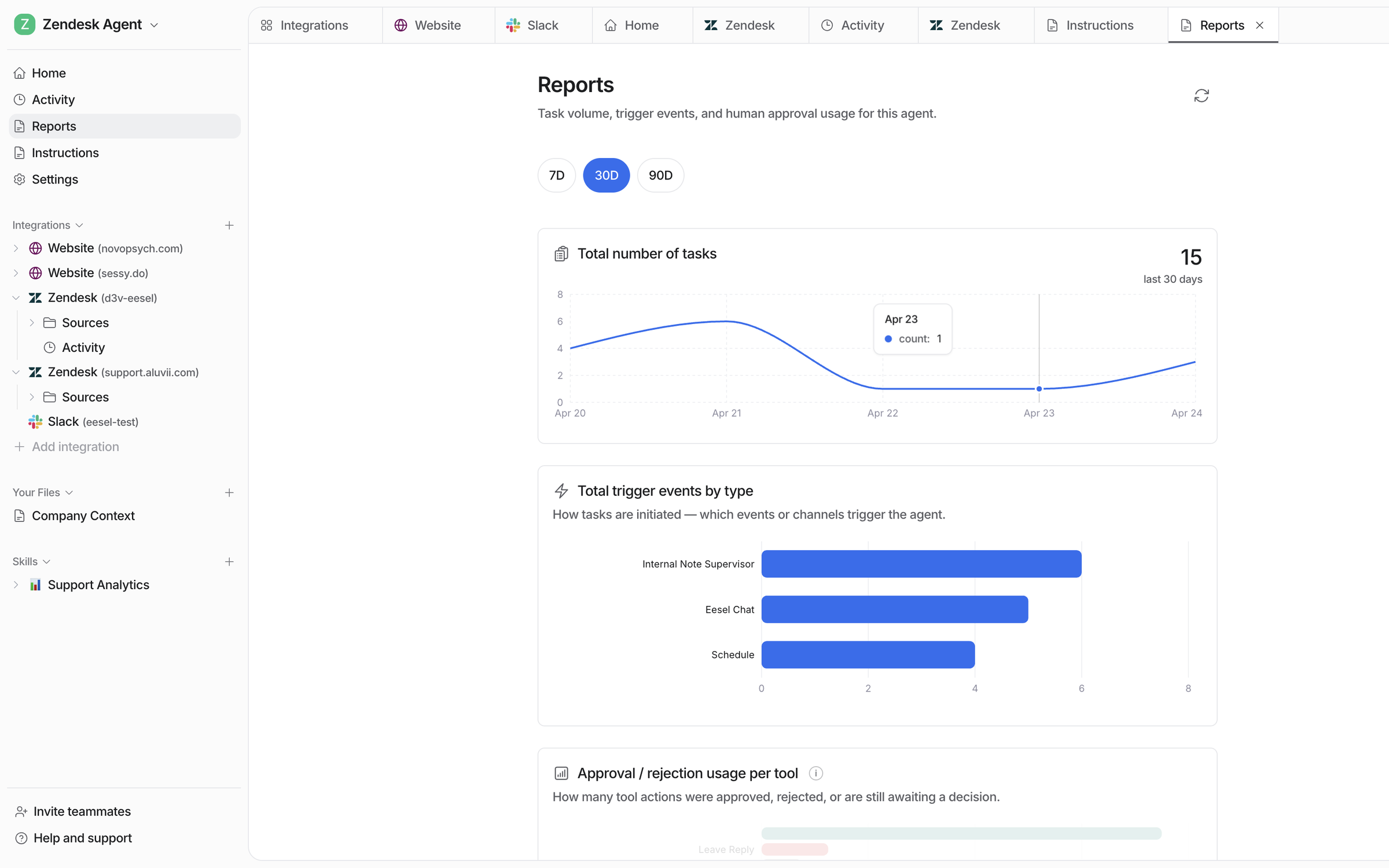
<figure><img src="https://3732419023-files.gitbook.io/~/files/v0/b/gitbook-x-prod.appspot.com/o/spaces%2F2xXO0947TYoPIhGoBgSE%2Fuploads%2Fgit-blob-eef4468bbdc2071beee6a55cad226d924d1c1464%2Freports-volume.png?alt=media" alt="The Reports page showing time range options, a Total number of tasks chart, and Total trigger events by type broken down by trigger"><figcaption><p>The top of the Reports page: how much work came in, and which triggers brought it.</p></figcaption></figure>

## Ask your agent for a report

{% stepper %}
{% step %}

### Ask in chat

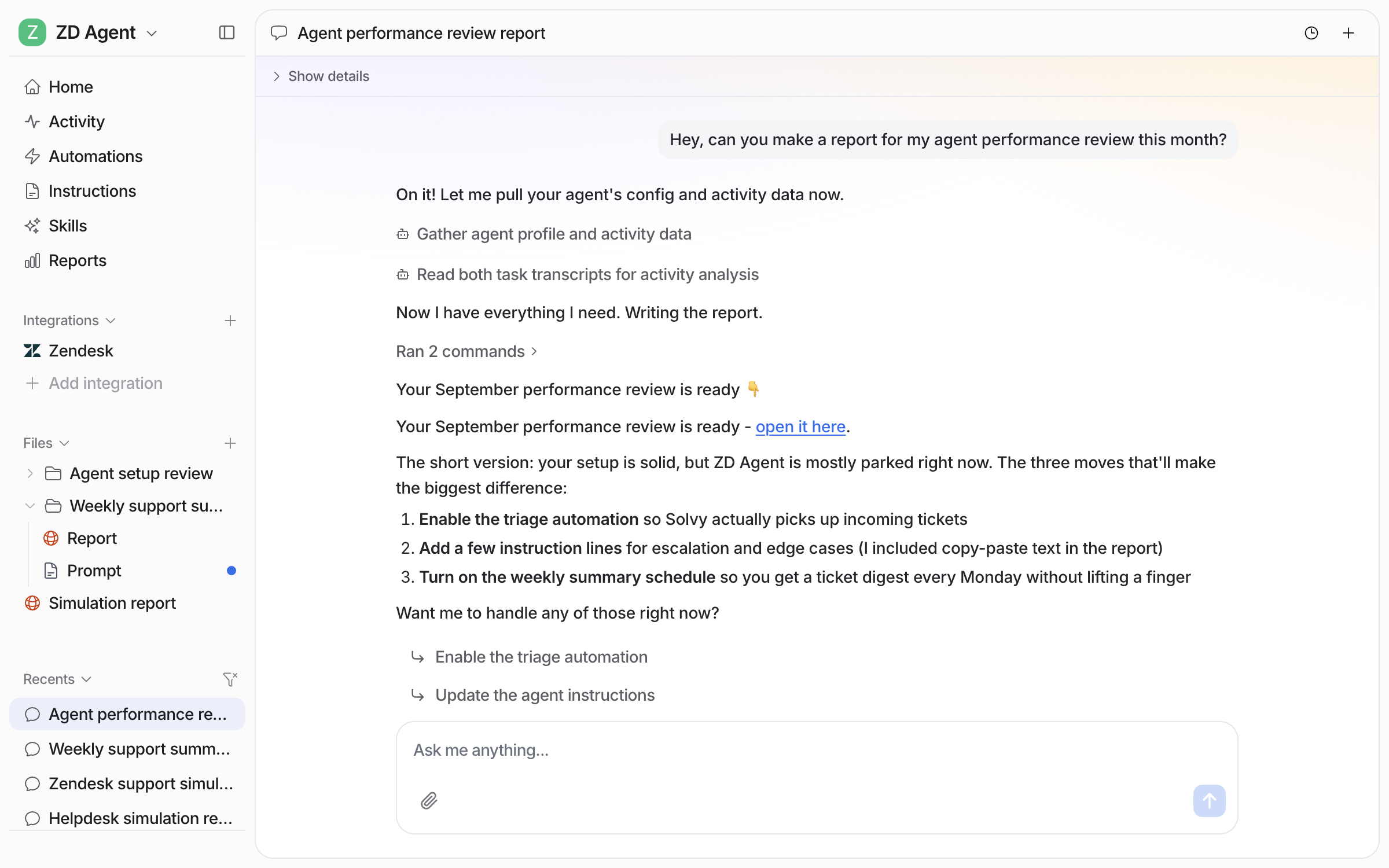
Open the chat in your dashboard and ask for the report you want, for example a performance review for the month. Your agent reads its own setup and activity, picks the right report [skill](/skills/skills.md), and saves the report as a file in your agent's **Files**. In the chat it gives you the short version and offers to act on it.

<figure><img src="https://3732419023-files.gitbook.io/~/files/v0/b/gitbook-x-prod.appspot.com/o/spaces%2F2xXO0947TYoPIhGoBgSE%2Fuploads%2Fgit-blob-45fb98b2437f069fd09c1fbbf70f349d6cd0e59c%2Freports-ask-chat.png?alt=media" alt="The dashboard chat where the user asks for a performance review report for the month, and the agent gathers its activity data, links the finished report and lists the three changes that would make the biggest difference"><figcaption><p>The chat after a report ask: the linked review and the three changes it recommends.</p></figcaption></figure>

**Check it worked.** The report is listed under **Files** in the left sidebar. From a terminal, `eesel files` lists it.
{% endstep %}

{% step %}

### Open the report

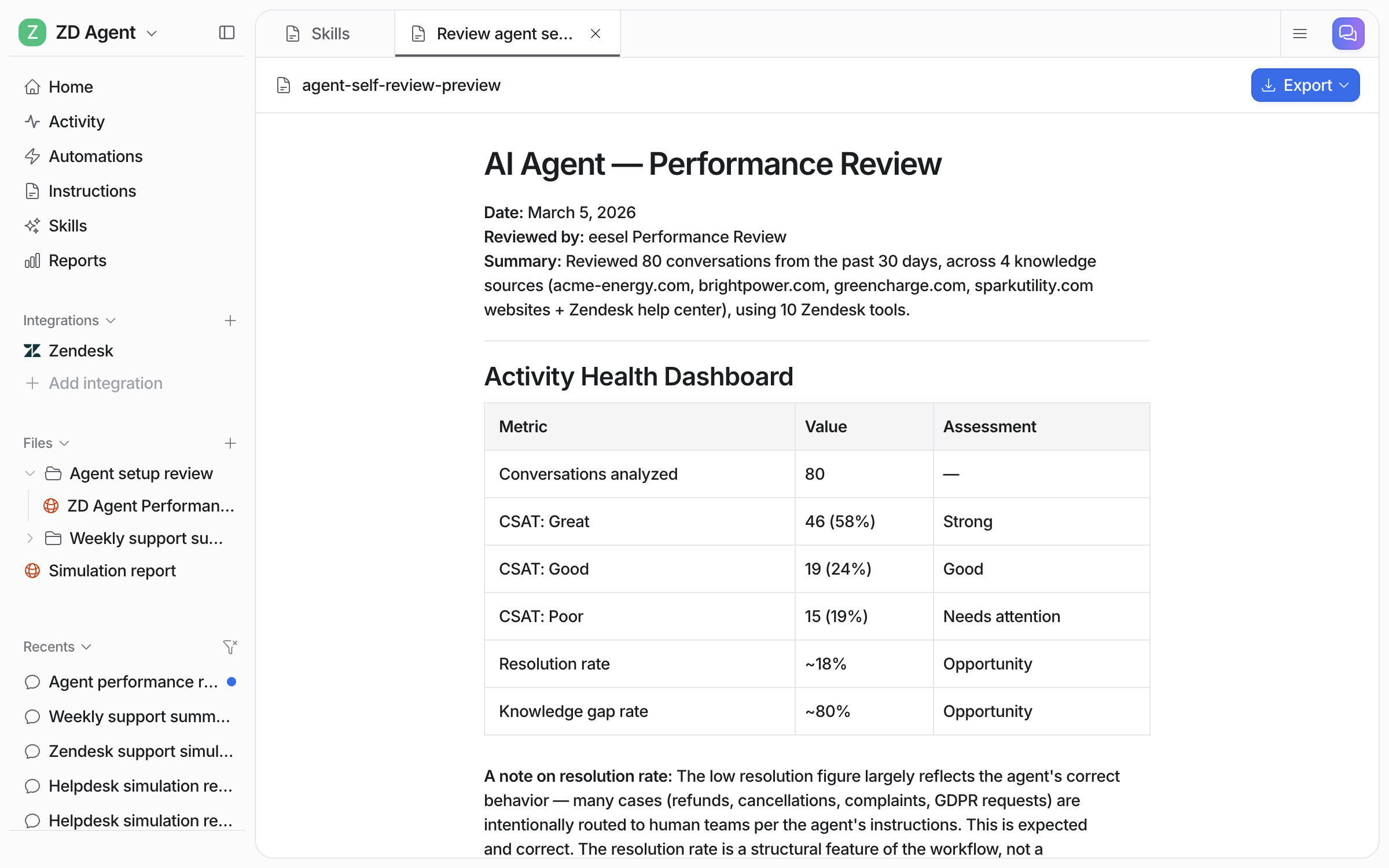
Click the link in the chat, or the file under **Files**. The report opens as a document beside the chat, with the numbers first.

<figure><img src="https://3732419023-files.gitbook.io/~/files/v0/b/gitbook-x-prod.appspot.com/o/spaces%2F2xXO0947TYoPIhGoBgSE%2Fuploads%2Fgit-blob-d5d71ce6581fd477874c6621f5c6cd4639f8f4b8%2Freports-file-open.png?alt=media" alt="The performance review report open as a document, with a summary of the conversations reviewed and an Activity Health Dashboard table of CSAT, resolution rate and knowledge gap rate"><figcaption><p>The health table at the top of the report.</p></figcaption></figure>

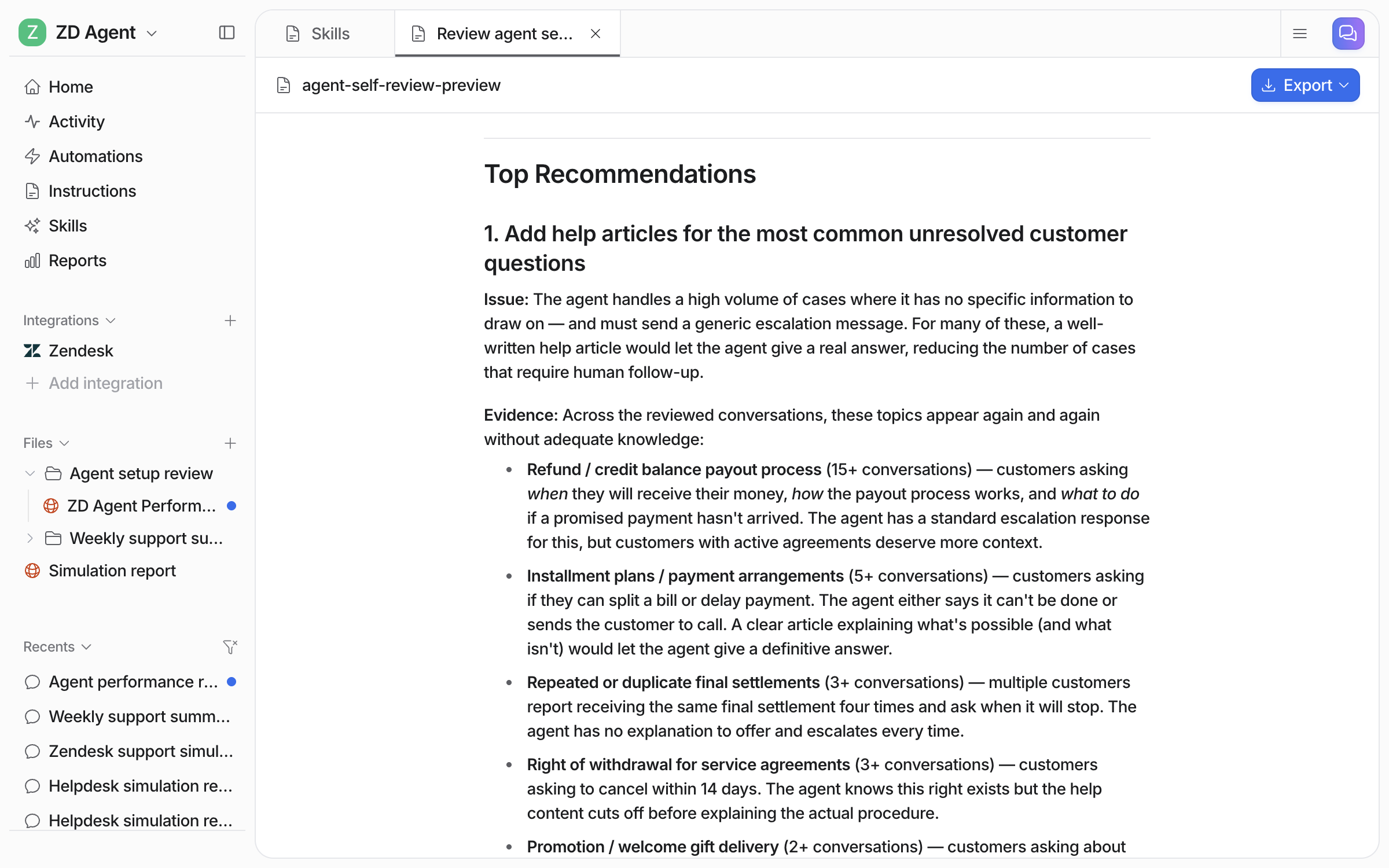
Below the numbers come the recommendations, each with the evidence behind it and the change to make.

<figure><img src="https://3732419023-files.gitbook.io/~/files/v0/b/gitbook-x-prod.appspot.com/o/spaces%2F2xXO0947TYoPIhGoBgSE%2Fuploads%2Fgit-blob-c3c8d7c8aa7678d1186028fa4e4fb9eaf86e71be%2Freports-file-recommendations.png?alt=media" alt="The report&#x27;s Top Recommendations section, listing the help articles to add for the most common unresolved customer questions with the evidence for each"><figcaption><p>The Top Recommendations section of the report.</p></figcaption></figure>

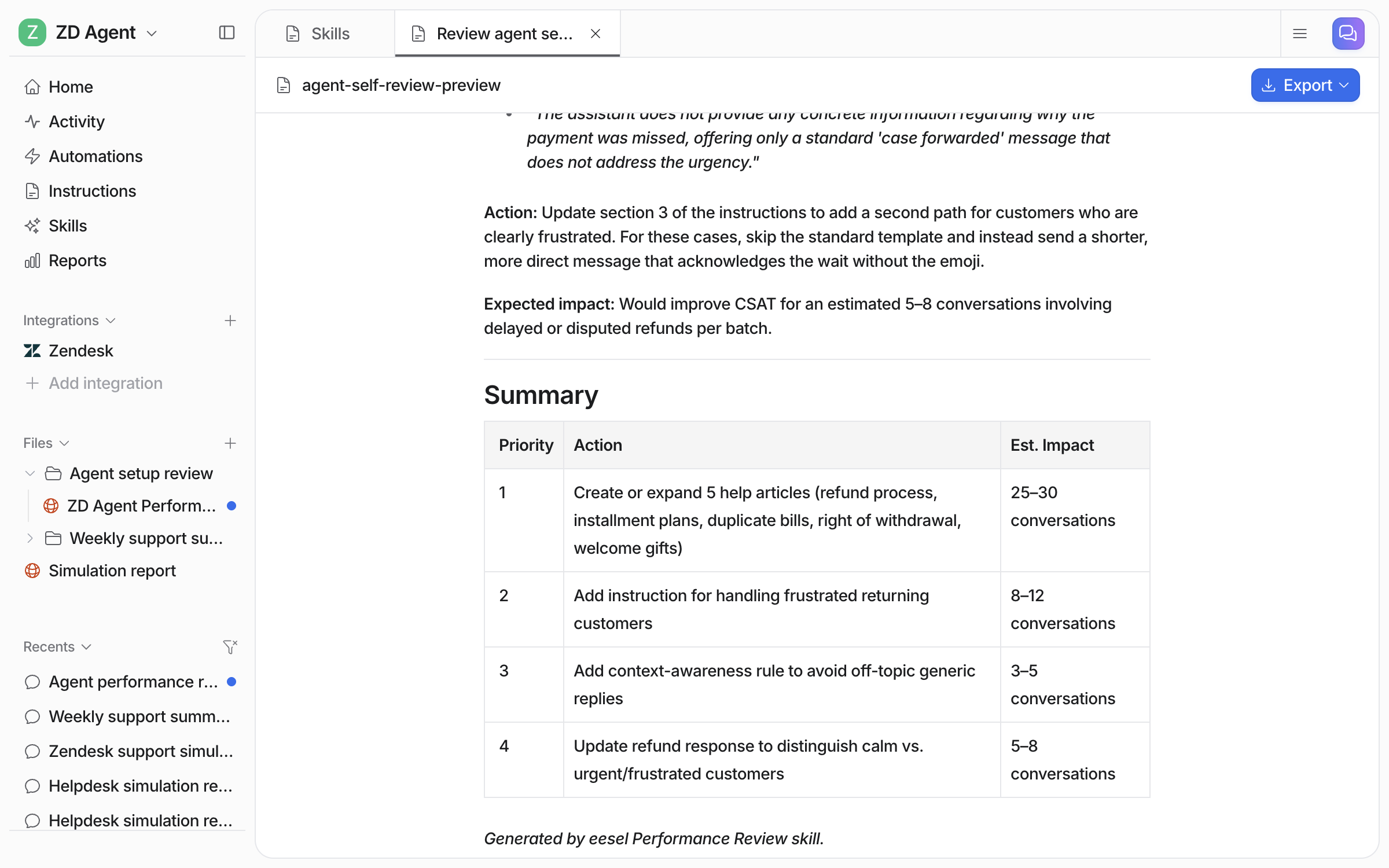
It ends with a summary table you can hand to your team.

<figure><img src="https://3732419023-files.gitbook.io/~/files/v0/b/gitbook-x-prod.appspot.com/o/spaces%2F2xXO0947TYoPIhGoBgSE%2Fuploads%2Fgit-blob-b24ef5c8ae5d4a7686f2400ed6750ea4b76d867b%2Freports-file-summary.png?alt=media" alt="The report&#x27;s Summary table listing four prioritised actions with the estimated number of conversations each would improve"><figcaption><p>Four prioritised actions, each with the conversations it would improve.</p></figcaption></figure>
{% endstep %}

{% step %}

### Put it on a schedule

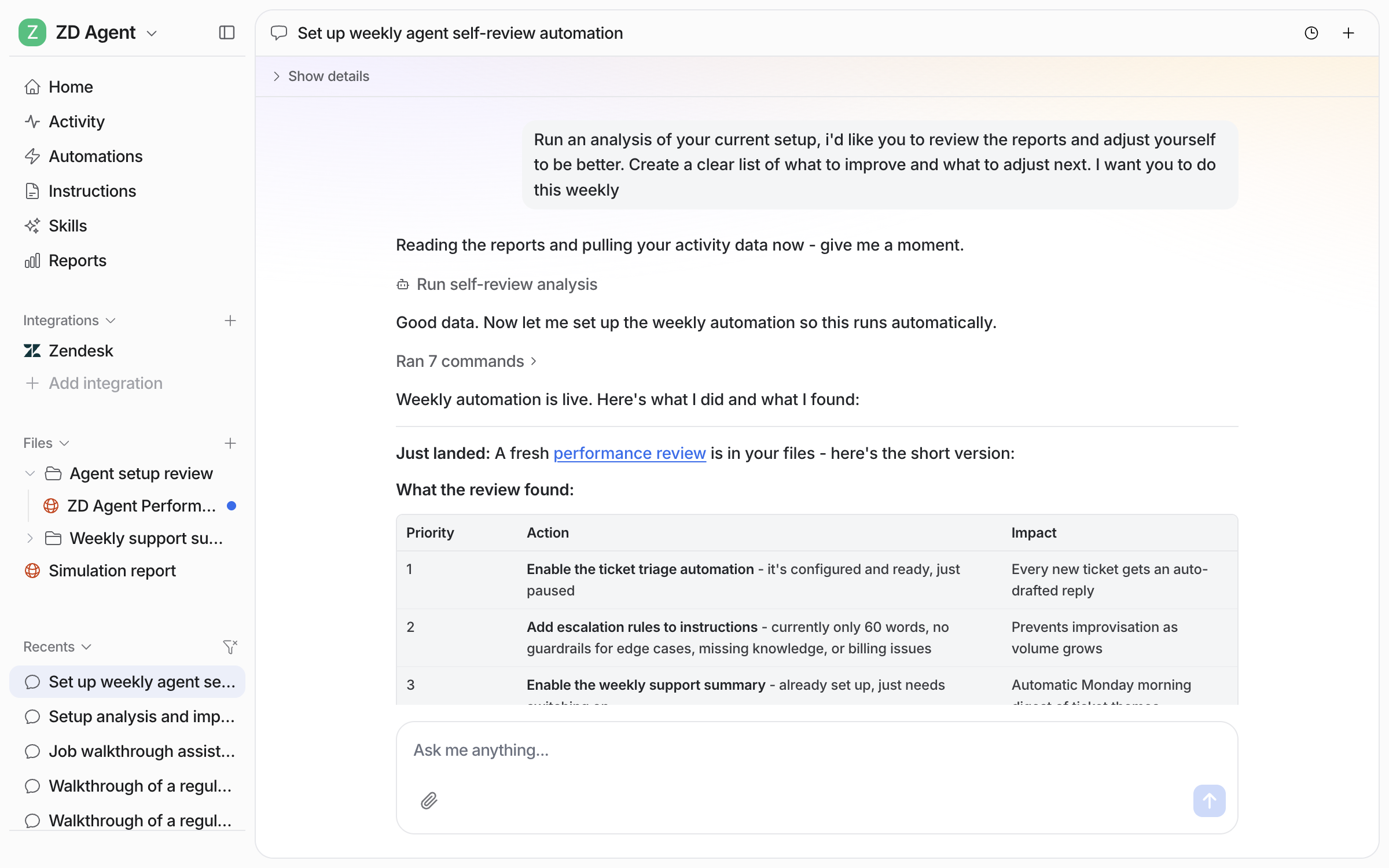
Ask for a report every week, here a weekly review of your agent's own results, and your agent creates a [schedule](/automations-and-schedules/automations-and-schedules.md), runs it once straight away, and tells you what it found.

<figure><img src="https://3732419023-files.gitbook.io/~/files/v0/b/gitbook-x-prod.appspot.com/o/spaces%2F2xXO0947TYoPIhGoBgSE%2Fuploads%2Fgit-blob-7b93f65bfec42dc35d7f5520689db971eab83dcc%2Finstructions-review-ask.png?alt=media" alt="The dashboard chat where the user asks the agent to review its setup and results and repeat it weekly, and the agent runs the analysis and sets up the weekly automation"><figcaption><p>The weekly review asked for in chat, with the analysis running.</p></figcaption></figure>

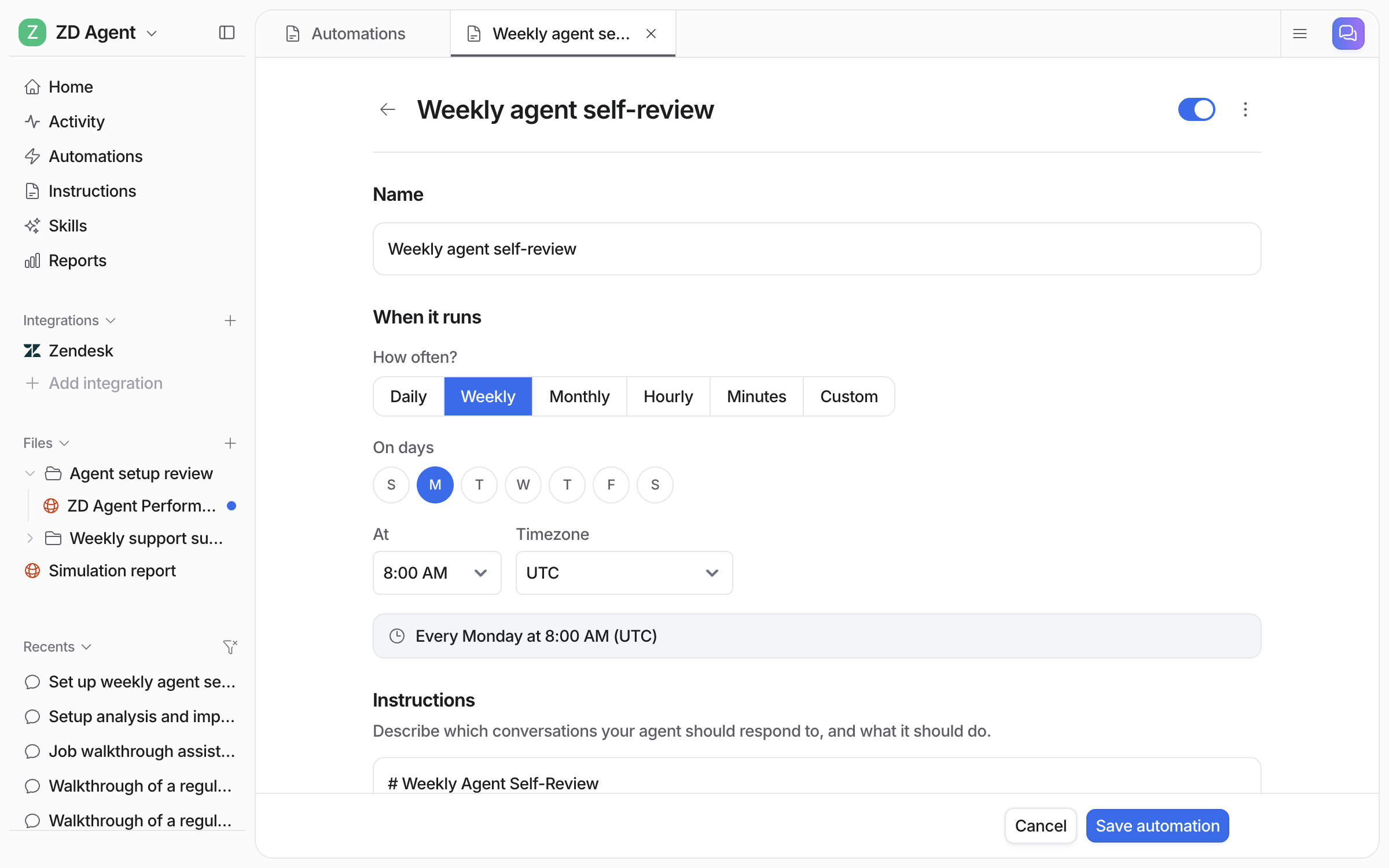
The schedule appears on your **Automations** page, switched on. Open it to change the day, the time or what the report covers.

<figure><img src="https://3732419023-files.gitbook.io/~/files/v0/b/gitbook-x-prod.appspot.com/o/spaces%2F2xXO0947TYoPIhGoBgSE%2Fuploads%2Fgit-blob-85d77f91fa8c417492cbcf847c61b24e6872e5ca%2Finstructions-review-schedule.png?alt=media" alt="The schedule editor for the weekly agent self-review, set to every Monday at 8:00 AM UTC, with the instructions below"><figcaption><p>The weekly review schedule, set to Monday at 8:00 AM UTC.</p></figcaption></figure>
{% endstep %}
{% endstepper %}

The skills behind these reports:

| Skill                           | What it produces                                                                                            |
| ------------------------------- | ----------------------------------------------------------------------------------------------------------- |
| **Analyze ticket trends**       | The themes that keep coming up across your tickets, with sentiment, volume and how they get resolved        |
| **Simulation**                  | A scored report of how your agent handles a batch of your real tickets, with the gaps and the fixes         |
| **Analyze and improve replies** | The patterns in what your team rejected or edited, and the instruction changes that stop it happening again |
| **Review agent setup**          | An audit of how your agent is set up and performing, with what to change                                    |

## The Reports page

Open **Reports** in the left sidebar. Pick a window at the top: the last 24 hours, 7, 30 or 90 days, or a custom range.

| Area               | Card                                | What it tells you                                         |
| ------------------ | ----------------------------------- | --------------------------------------------------------- |
| **Volume**         | Total number of tasks               | How much work your agent picked up over the window        |
|                    | Total trigger events by type        | How that work reached it, by trigger                      |
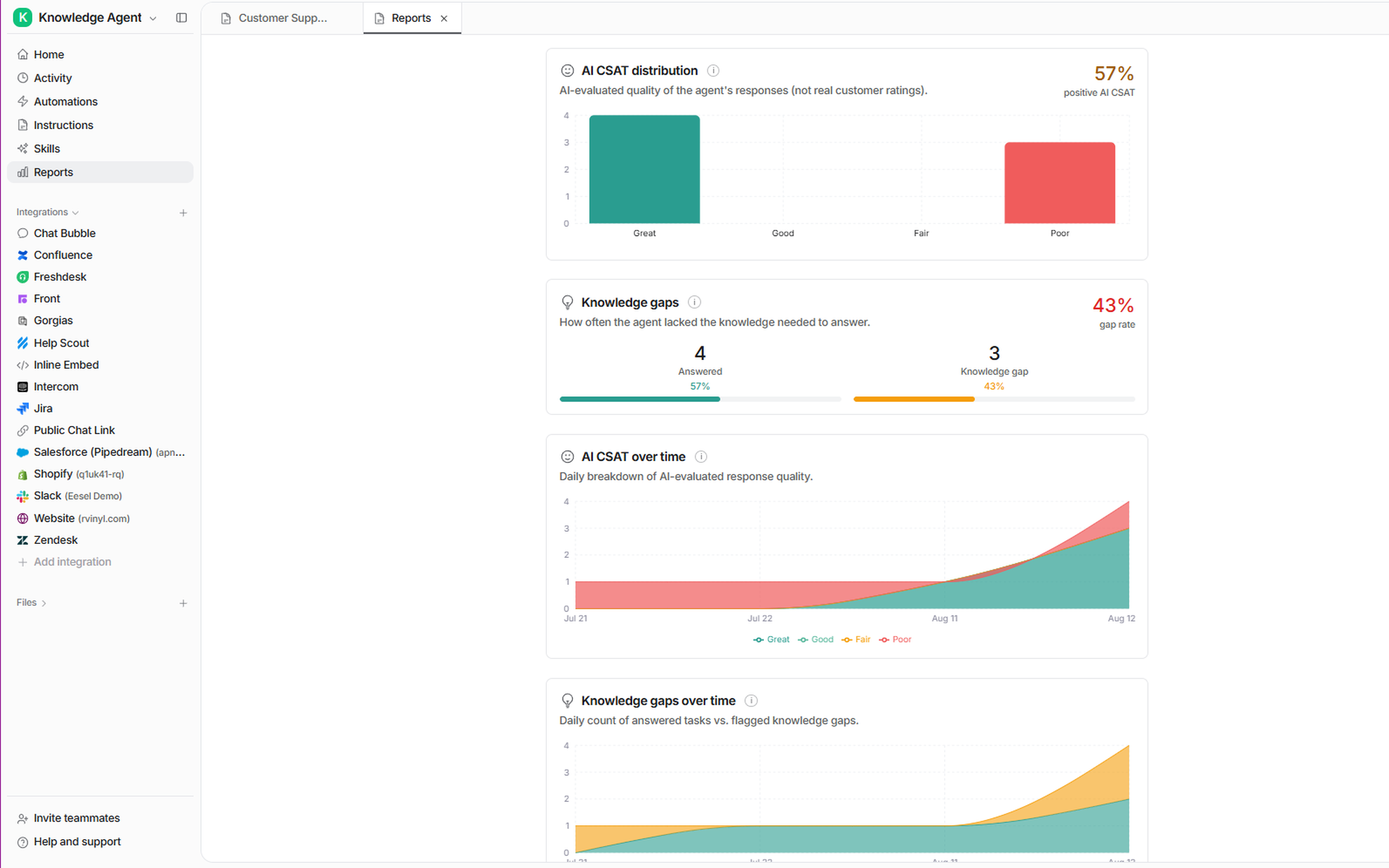
| **Quality**        | AI CSAT distribution                | A quality score for the agent's answers across the window |
|                    | AI CSAT over time                   | The same score day by day                                 |
| **Knowledge gaps** | Knowledge gaps                      | How often it did not have the knowledge to answer         |
|                    | Knowledge gaps over time            | Answered tasks against flagged gaps, day by day           |
| **Approvals**      | Approval / rejection usage per tool | For each action: approved, rejected, or still waiting     |
|                    | Approval efficiency                 | How much went through first time                          |
|                    | Review times                        | How long your team takes to approve or reject             |
|                    | Approval trend over time            | Approvals and rejections day by day                       |

<figure><img src="https://3732419023-files.gitbook.io/~/files/v0/b/gitbook-x-prod.appspot.com/o/spaces%2F2xXO0947TYoPIhGoBgSE%2Fuploads%2Fgit-blob-2bd572593b8dee4563fa867734eefa2b60493f7d%2Freports-quality-gaps.png?alt=media" alt="Reports cards showing AI CSAT distribution with a positive score, Knowledge gaps split between answered tasks and flagged gaps with a gap rate, and both plotted over time"><figcaption><p>Quality and knowledge gaps, as a snapshot and day by day.</p></figcaption></figure>

How to read it:

* **The trigger breakdown** shows which triggers bring the most work, and which bring none.
* **AI CSAT is not customer feedback.** It is an AI's rating of your agent's answers. Useful as an internal quality signal, not a substitute for asking your customers.
* **A knowledge gap is your agent telling you something is missing** from your documentation. Rising gaps on one topic show which articles to write, and the **Update knowledge base** [skill](/skills/skills.md) can draft them.
* **Approvals tell you when to hand over more.** An action approved every time without edits is ready to run on its own. One that keeps getting rejected needs an [instructions](/instructions-and-memory/instructions-and-memory.md) fix. Long review times mean approvals are sitting unanswered.

## Activity: the individual runs

Reports show the pattern. **Activity** in the left sidebar is where you look at one piece of work.

Every task your agent has run is listed there, from every app: a Zendesk ticket, a Slack question, an email and a scheduled run all appear in one history. For each one you can see:

* **Where it happened**, with a link to the original ticket or thread
* **What set it off**, the trigger or automation
* **What it read**, the sources it searched
* **What it did**, every action, and where a person approved it
* **Why**, its reasoning step by step
* **Whether it hit a knowledge gap**

When an answer is wrong, read what your agent searched, found and concluded, then fix the cause. Or point your agent at the run in chat. It walks you through its reasoning, offers the fix, and saves the rule to its [instructions](/instructions-and-memory/instructions-and-memory.md) when you agree.

## Exporting

Task data can be exported for your own analysis. Exports are prepared in the background and emailed to you as a download link when they are ready.

## Related pages

* [Skills](/skills/skills.md) for the reporting skills and how to run them
* [Automations and Schedules](/automations-and-schedules/automations-and-schedules.md) to have reports arrive on a schedule
* [Instructions and Memory](/instructions-and-memory/instructions-and-memory.md) for acting on what the reports tell you


---

# Agent Instructions
This documentation is published with GitBook. GitBook is the documentation platform designed so that both humans and AI agents can read, navigate, and reason over technical content effectively. Learn more at gitbook.com.

## Querying This Documentation
If you need additional information that is not directly available in this page, you can query the documentation dynamically by asking a question.

Perform an HTTP GET request on the current page URL with the `ask` query parameter, and the optional `goal` query parameter:

```
GET https://docs.eesel.ai/reports/reports.md?ask=<question>&goal=<endgoal>
```

`ask` is the immediate question: it should be specific, self-contained, and written in natural language.
`goal` is optional and describes the broader end goal you are ultimately trying to accomplish on behalf of the user. GitBook uses it to tailor the answer towards what is most useful for that goal.

The response will contain a direct answer to the question and relevant excerpts and sources from the documentation.

Use this mechanism when the answer is not explicitly present in the current page, you need clarification or additional context, or you want to retrieve related documentation sections.