> For the complete documentation index, see [llms.txt](https://docs.eesel.ai/llms.txt). Markdown versions of documentation pages are available by appending `.md` to page URLs; this page is available as [Markdown](https://docs.eesel.ai/use-cases/internal-operations.md).

# Internal Operations

Set up your agent to answer your team's questions in Slack from your wiki, documents and other connected apps, with the source linked in the thread.

Your AI teammate answers your team's questions in the chat app they already use. It reads your wiki, your documents and every other app you connect to it. Answers come back in the thread, with the source.

You stay in control the whole way. Nothing runs until you create an automation. For each action you then choose: run on its own, ask you first, or stay off.

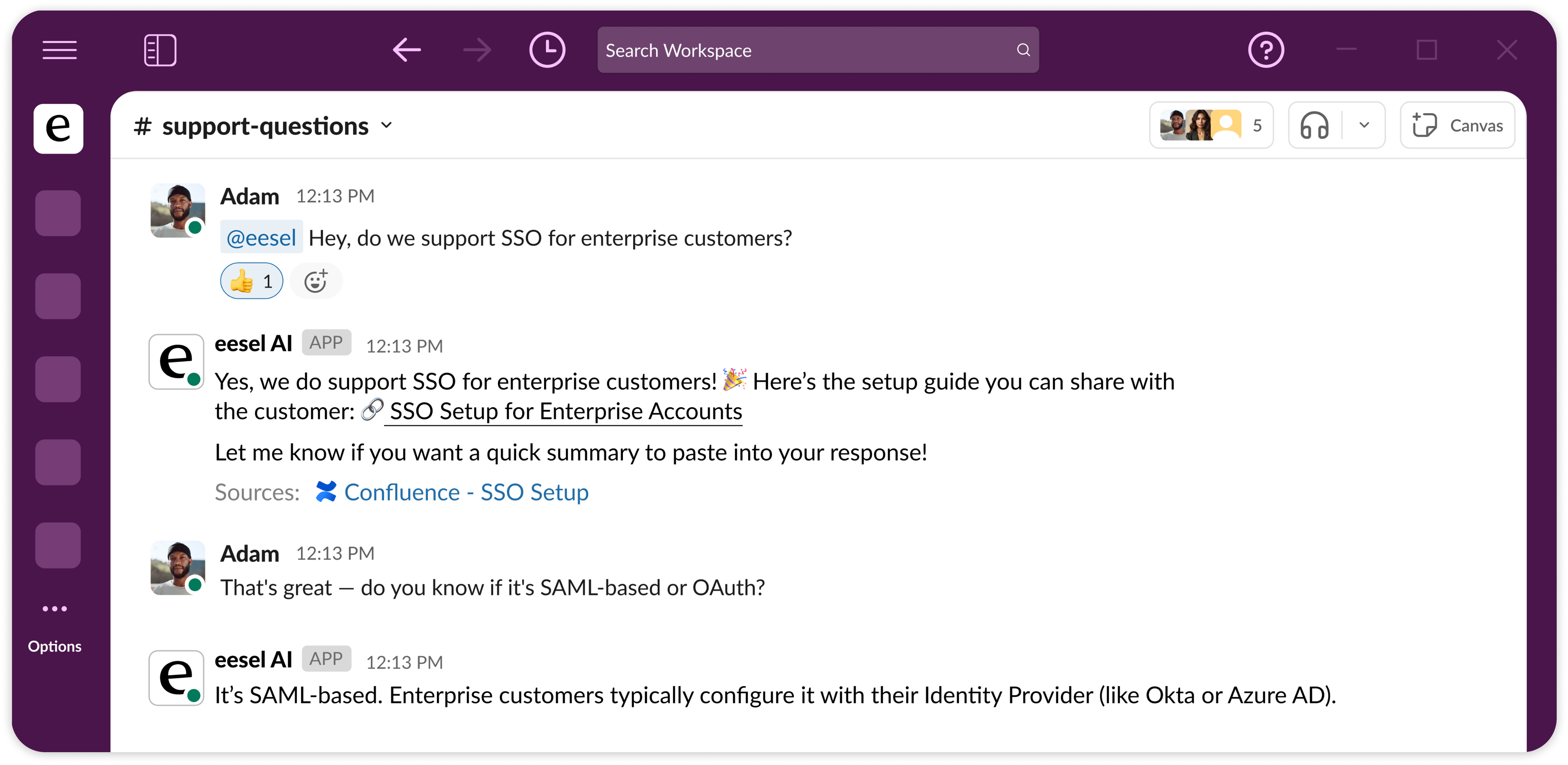
In this example a teammate asks about SSO in Slack, and the answer cites the Confluence page it came from.

<figure><img src="https://3732419023-files.gitbook.io/~/files/v0/b/gitbook-x-prod.appspot.com/o/spaces%2F2xXO0947TYoPIhGoBgSE%2Fuploads%2Fgit-blob-107a22cc2e8de270b811dcb01821622a331fc0c4%2Finternal-ops-hero.png?alt=media" alt="A team chat channel where someone asks whether the company supports SSO for enterprise customers, and eesel AI answers with a linked setup guide and cites the Confluence page it came from"><figcaption><p>A Slack question answered in the thread, with the source page linked.</p></figcaption></figure>

**Works with:** [Slack](/integrations/communication/slack.md), [Microsoft Teams](/integrations/communication/microsoft-teams.md), [Confluence](/integrations/knowledge/confluence.md), [Notion](/integrations/knowledge/notion.md), [Google Drive](/integrations/knowledge/google-drive.md), [uploaded files](/integrations/knowledge/uploading-files.md).

**Ideal for:** hard-to-navigate knowledge bases, onboarding new hires, policy lookups, and the repeat questions every team fields (IT, HR, ops).

## Quick start

{% stepper %}
{% step %}

### Create an agent

Open the agent dropdown at the top left and choose **Create Agent**. We recommend a separate agent for internal knowledge. Its instructions then stay focused on your team, not your customers. One agent can hold both roles if you prefer.
{% endstep %}

{% step %}

### Tell it about your business

There are two ways to give it your team's knowledge.

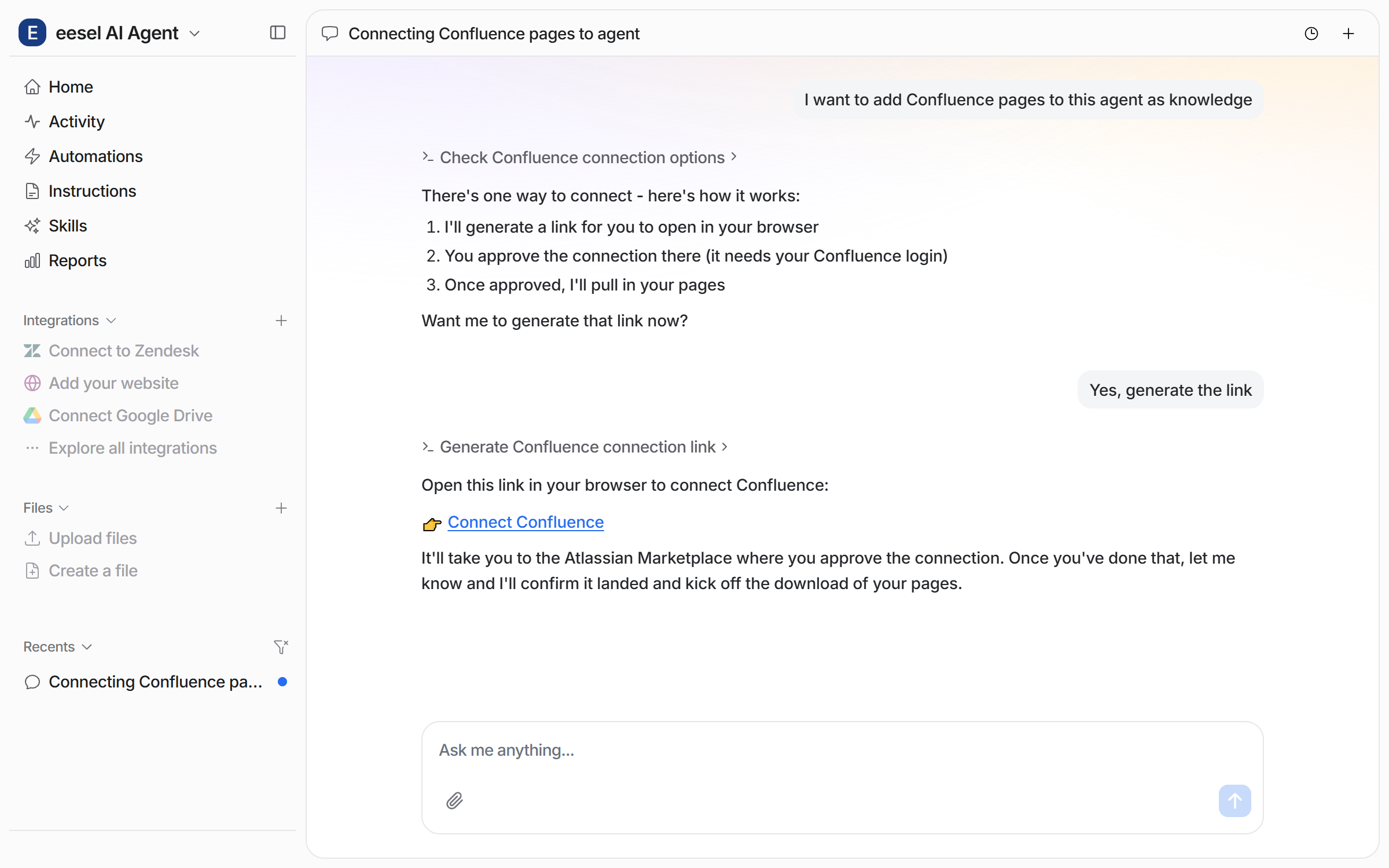
**Connect the apps where the knowledge lives.** Ask your agent to add your wiki pages, for example [Confluence](/integrations/knowledge/confluence.md). It posts a connect link, and a person approves it in the browser.

<figure><img src="https://3732419023-files.gitbook.io/~/files/v0/b/gitbook-x-prod.appspot.com/o/spaces%2F2xXO0947TYoPIhGoBgSE%2Fuploads%2Fgit-blob-8079c41d3a2901ed2c8195f1f71efdff4f03836f%2Fconfluence-connect-chat.png?alt=media" alt="The dashboard chat where the user asks to add Confluence pages as knowledge and the agent posts a Connect Confluence link"><figcaption><p>The agent posts the Connect Confluence link.</p></figcaption></figure>

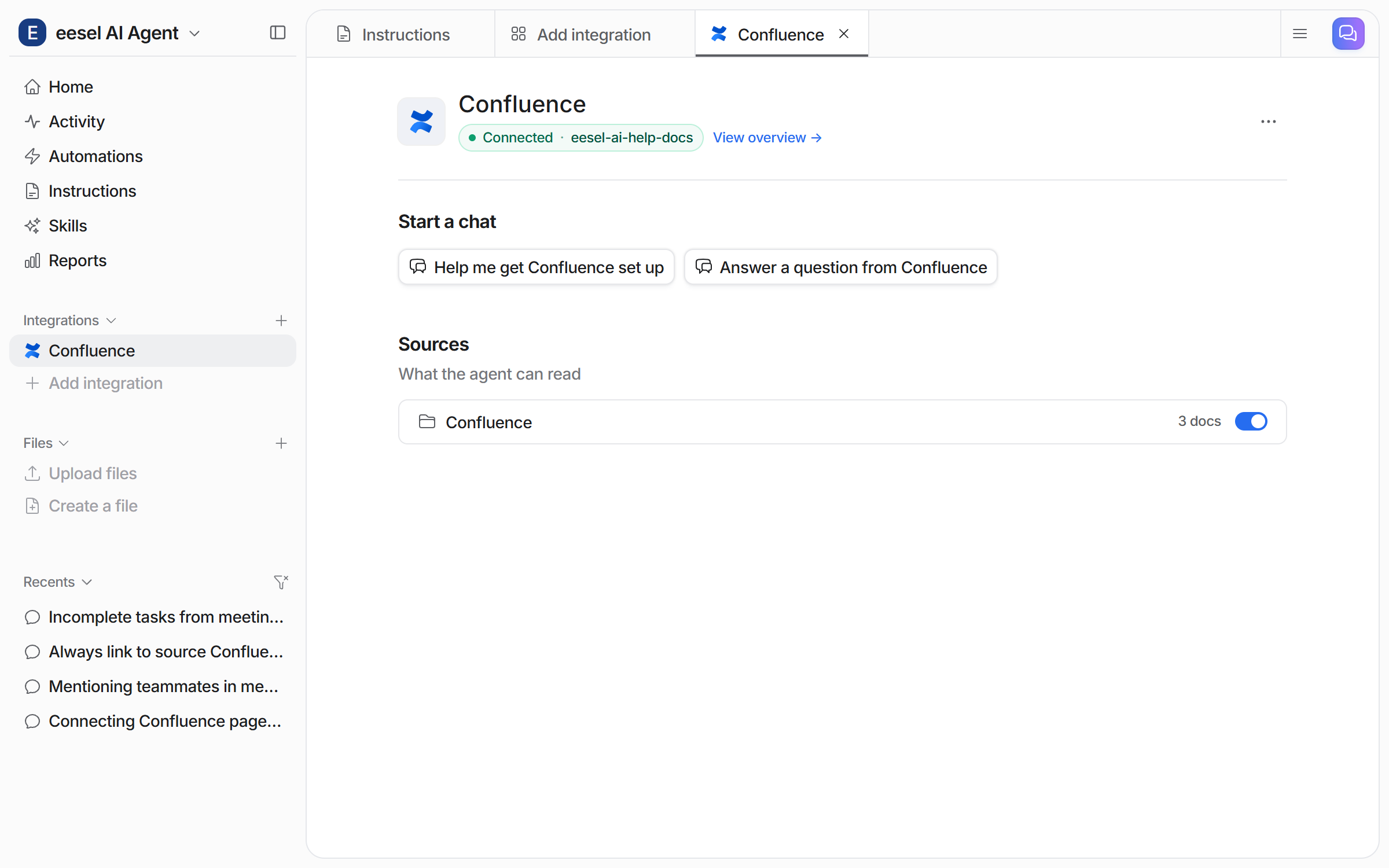
The integration page then shows the connection and how many documents it read.

<figure><img src="https://3732419023-files.gitbook.io/~/files/v0/b/gitbook-x-prod.appspot.com/o/spaces%2F2xXO0947TYoPIhGoBgSE%2Fuploads%2Fgit-blob-fe2ac400475d0060d463f0489830678b96de41d1%2Fconfluence-integration-page.png?alt=media" alt="The Confluence integration page in the dashboard showing Connected with the site name, Start a chat buttons, and a Confluence source row with a document count and a toggle"><figcaption><p>The Confluence integration page, with the source and its document count.</p></figcaption></figure>

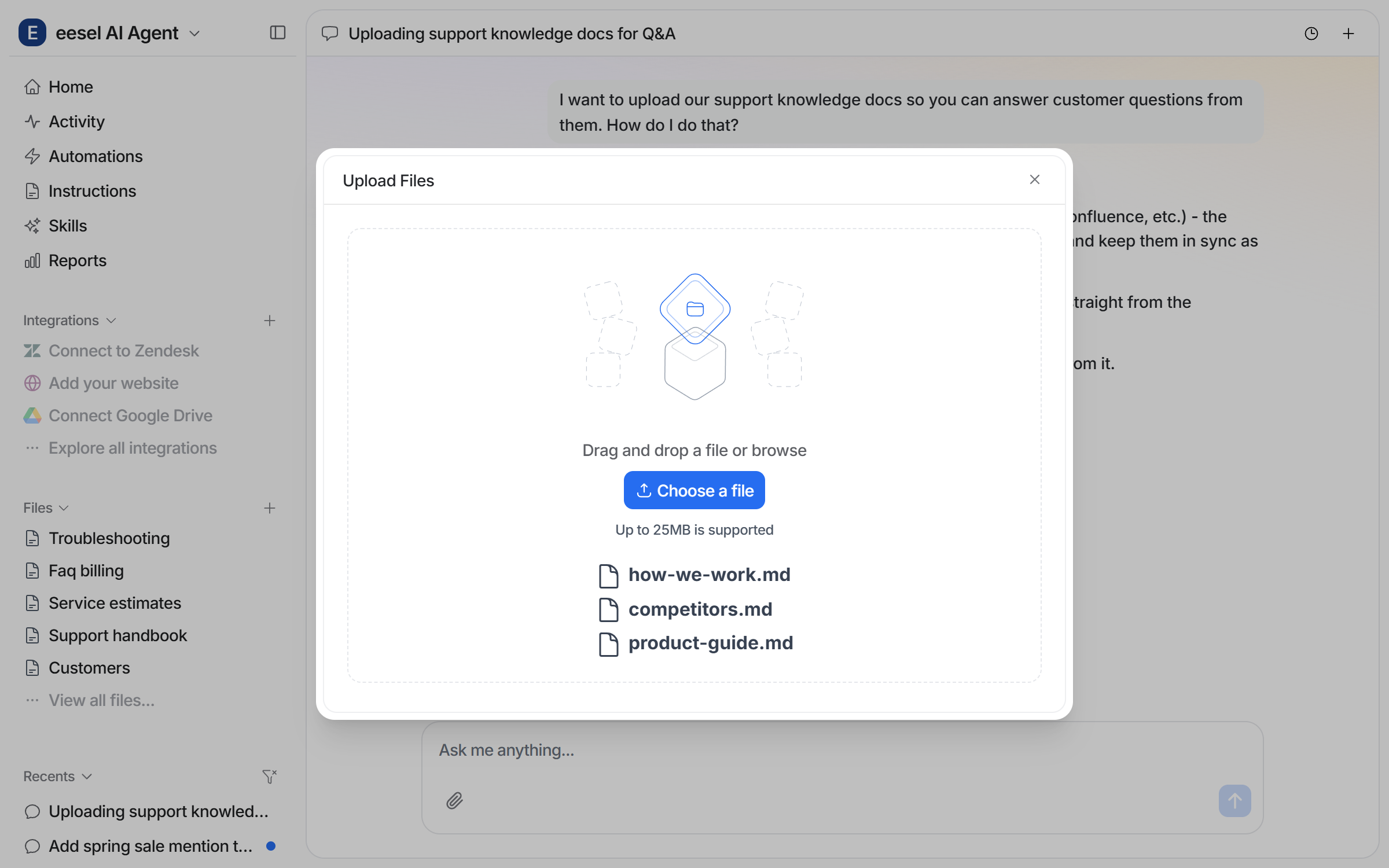
**Upload or create files.** Upload the documents you would hand a new starter.

<figure><img src="https://3732419023-files.gitbook.io/~/files/v0/b/gitbook-x-prod.appspot.com/o/spaces%2F2xXO0947TYoPIhGoBgSE%2Fuploads%2Fgit-blob-a34bd11986951152eb329f759662a5bd41173722%2Ffiles-upload-modal.png?alt=media" alt="The dashboard chat with the Upload Files modal open in front of it, showing a drag and drop area, a Choose a file button, the 25MB limit, and three files ready to upload"><figcaption><p>The upload area, opened from the chat, with files ready to go.</p></figcaption></figure>

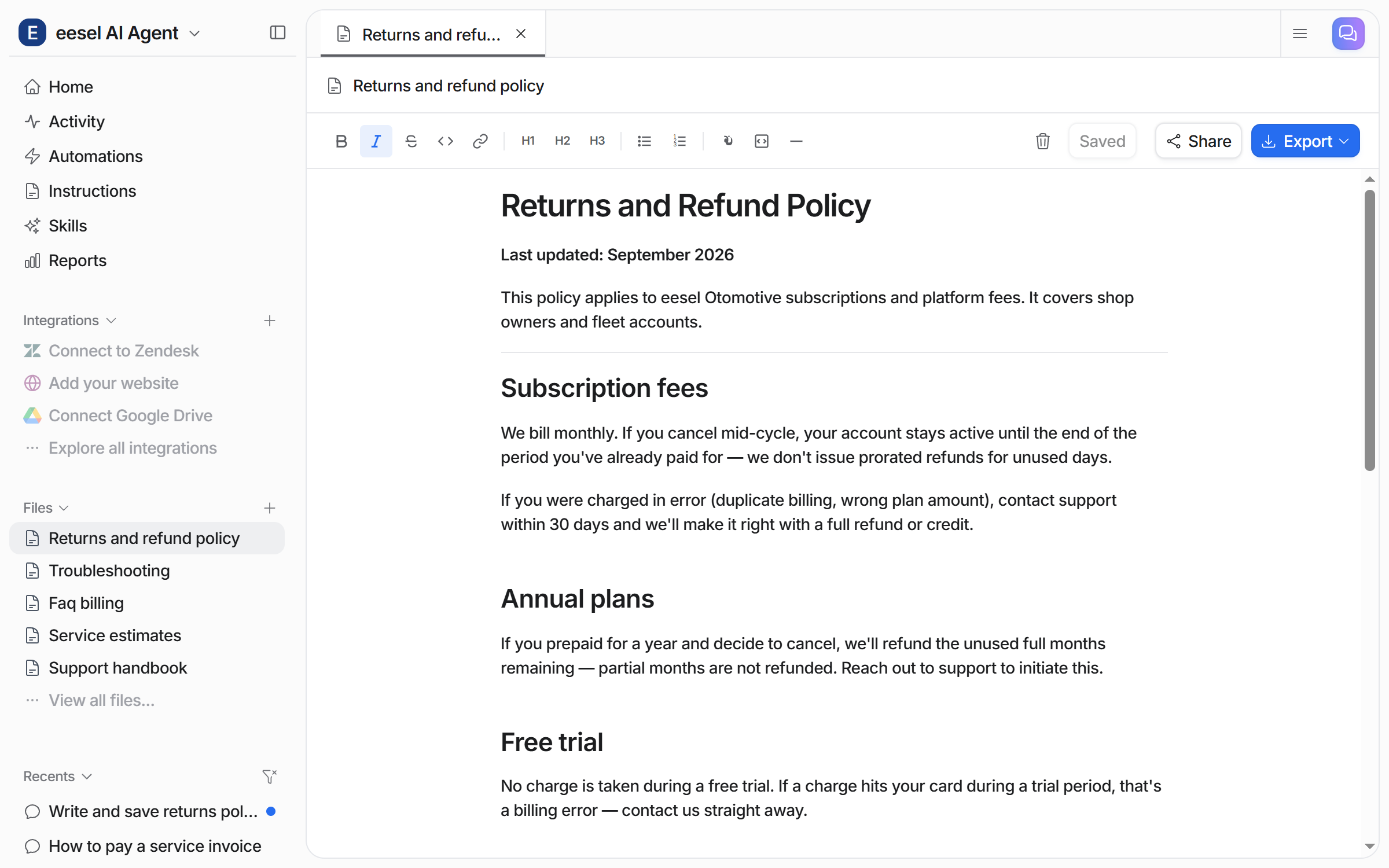
You can also ask your agent to write a document. It saves the file in the Files editor.

<figure><img src="https://3732419023-files.gitbook.io/~/files/v0/b/gitbook-x-prod.appspot.com/o/spaces%2F2xXO0947TYoPIhGoBgSE%2Fuploads%2Fgit-blob-bb6f355b08f924e8d1b0f8f51fba3bd24bb80b2b%2Ffiles-agent-written.png?alt=media" alt="A policy document the agent wrote, open in the Files editor with Saved, Share and Export controls, and the chat that asked for it listed under Recents"><figcaption><p>A file your agent wrote and saved, open in the Files editor.</p></figcaption></figure>
{% endstep %}

{% step %}

### Connect it to your team chat

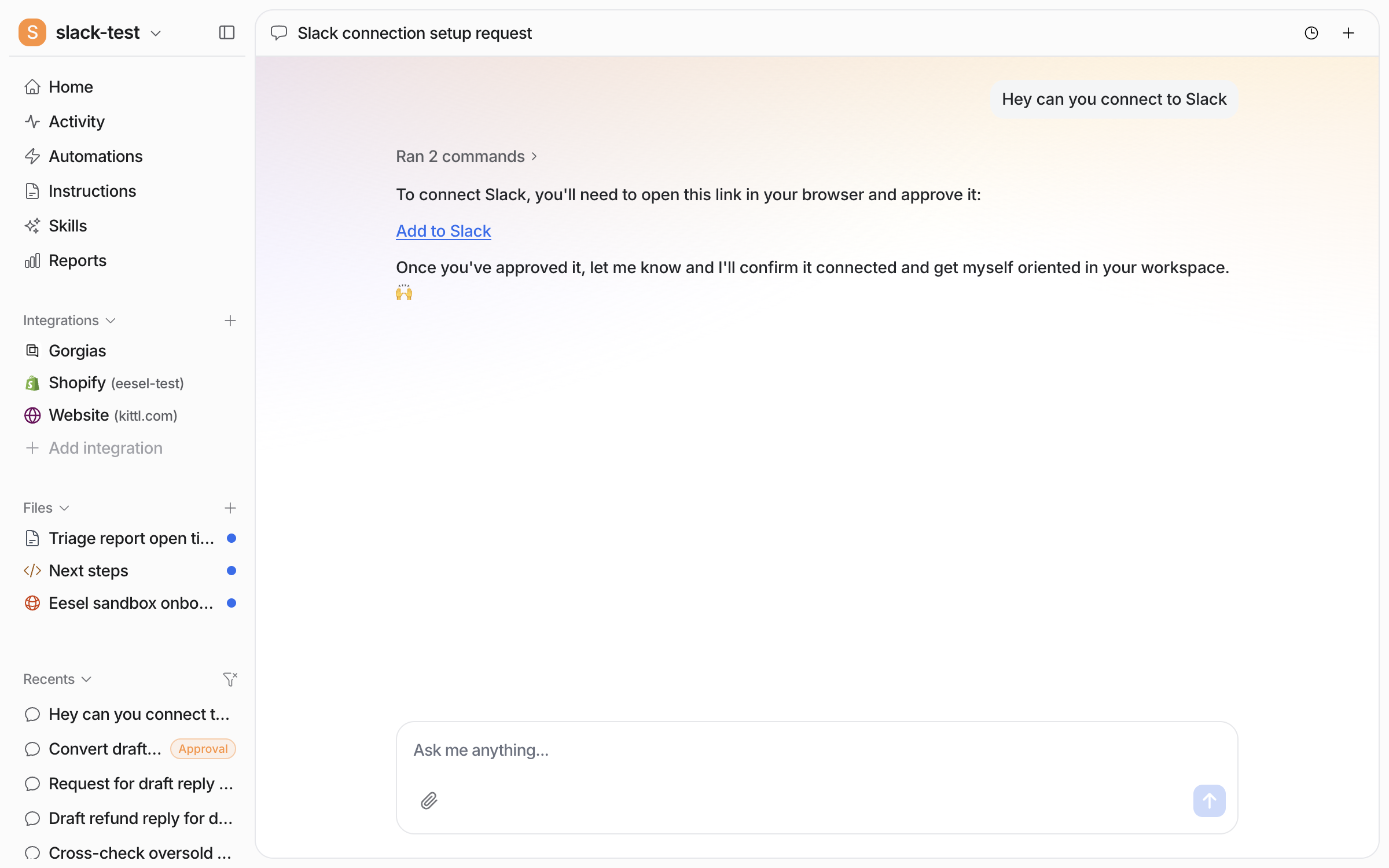
Ask your agent to connect Slack, then tell it which Slack channels to be active in. Microsoft Teams is available on request, so [contact us](https://eesel.ai/contact).

<figure><img src="https://3732419023-files.gitbook.io/~/files/v0/b/gitbook-x-prod.appspot.com/o/spaces%2F2xXO0947TYoPIhGoBgSE%2Fuploads%2Fgit-blob-c04a1cc36dbc7243c0b546eeb85ef3826f94ce63%2Fslack-connect-chat.png?alt=media" alt="The dashboard chat where the user asks to connect Slack and the agent posts an Add to Slack link to open and approve in the browser"><figcaption><p>The agent posts the Add to Slack link in the chat.</p></figcaption></figure>

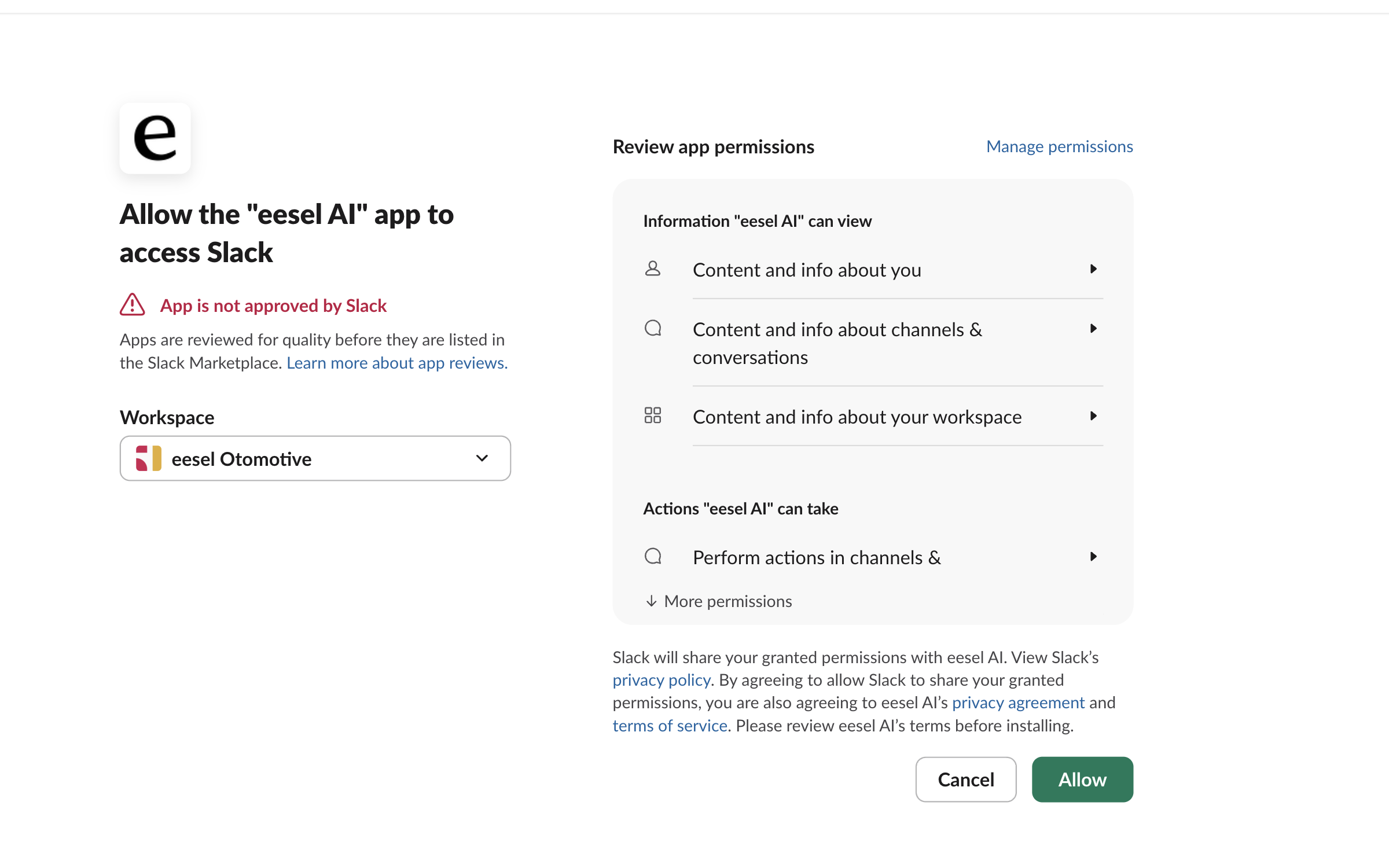
Open the link. A person approves this in the browser.

<figure><img src="https://3732419023-files.gitbook.io/~/files/v0/b/gitbook-x-prod.appspot.com/o/spaces%2F2xXO0947TYoPIhGoBgSE%2Fuploads%2Fgit-blob-7ad344df7886604f9c2e9a1c711d0e9330ce09be%2Fslack-oauth-approve.png?alt=media" alt="Slack&#x27;s permission screen asking to allow the eesel AI app to access Slack, with a not-approved-by-Slack notice, a workspace picker, the permission list and an Allow button"><figcaption><p>Slack's permission screen, with the workspace picker and the permission list.</p></figcaption></figure>
{% endstep %}

{% step %}

### Brief it on the job

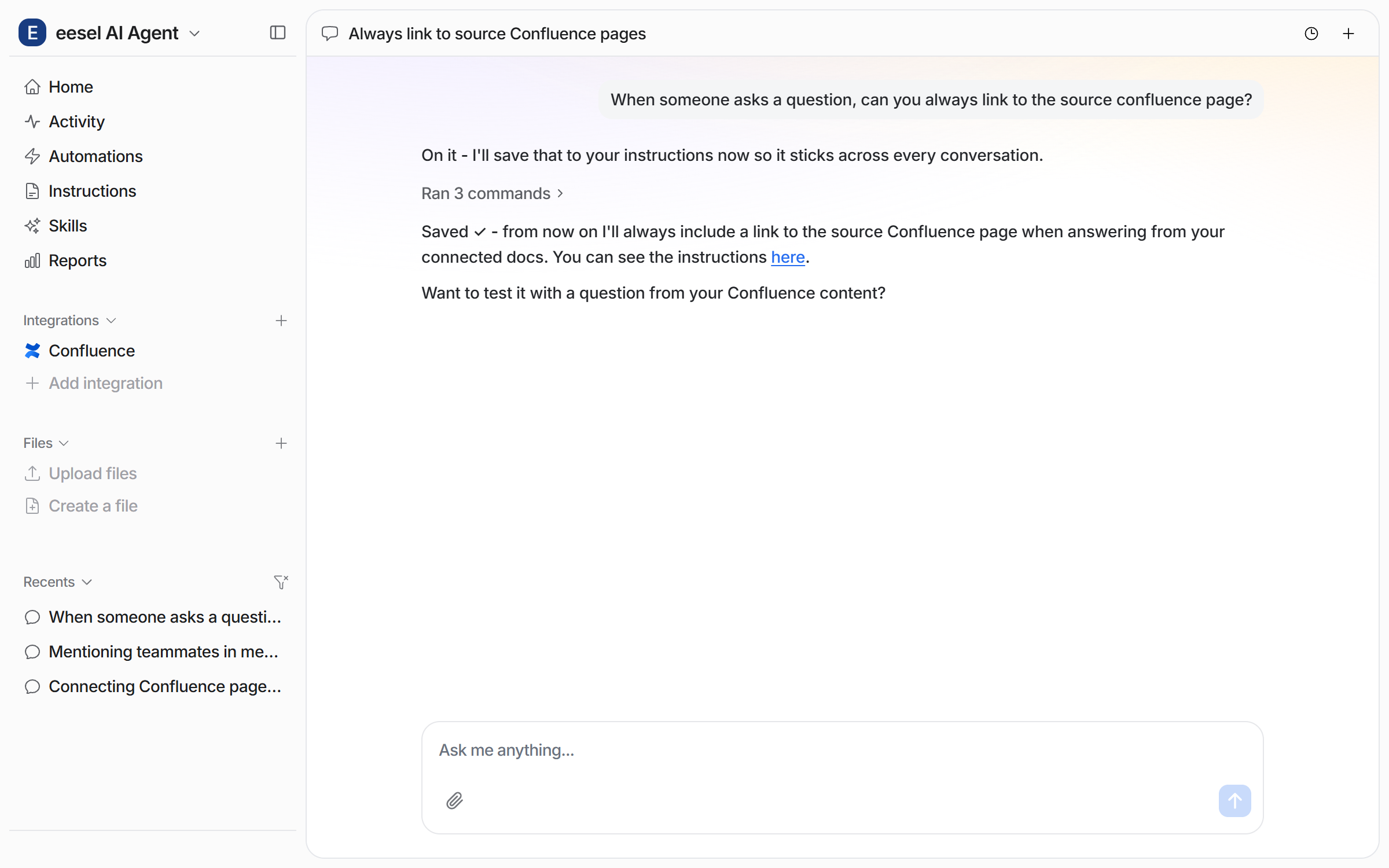
Tell it what tone to use, which sources to trust first, and when to escalate to a person. Ask for a standing rule in chat and it saves the rule to its own instructions.

<figure><img src="https://3732419023-files.gitbook.io/~/files/v0/b/gitbook-x-prod.appspot.com/o/spaces%2F2xXO0947TYoPIhGoBgSE%2Fuploads%2Fgit-blob-bbe39e6bfb794c408fefd4449f22093fb0d576ed%2Fconfluence-instruction-chat.png?alt=media" alt="The dashboard chat where the user asks the agent to always link the source Confluence page, and the agent saves it to its instructions"><figcaption><p>Ask in chat for a habit, and your agent saves it to its instructions.</p></figcaption></figure>

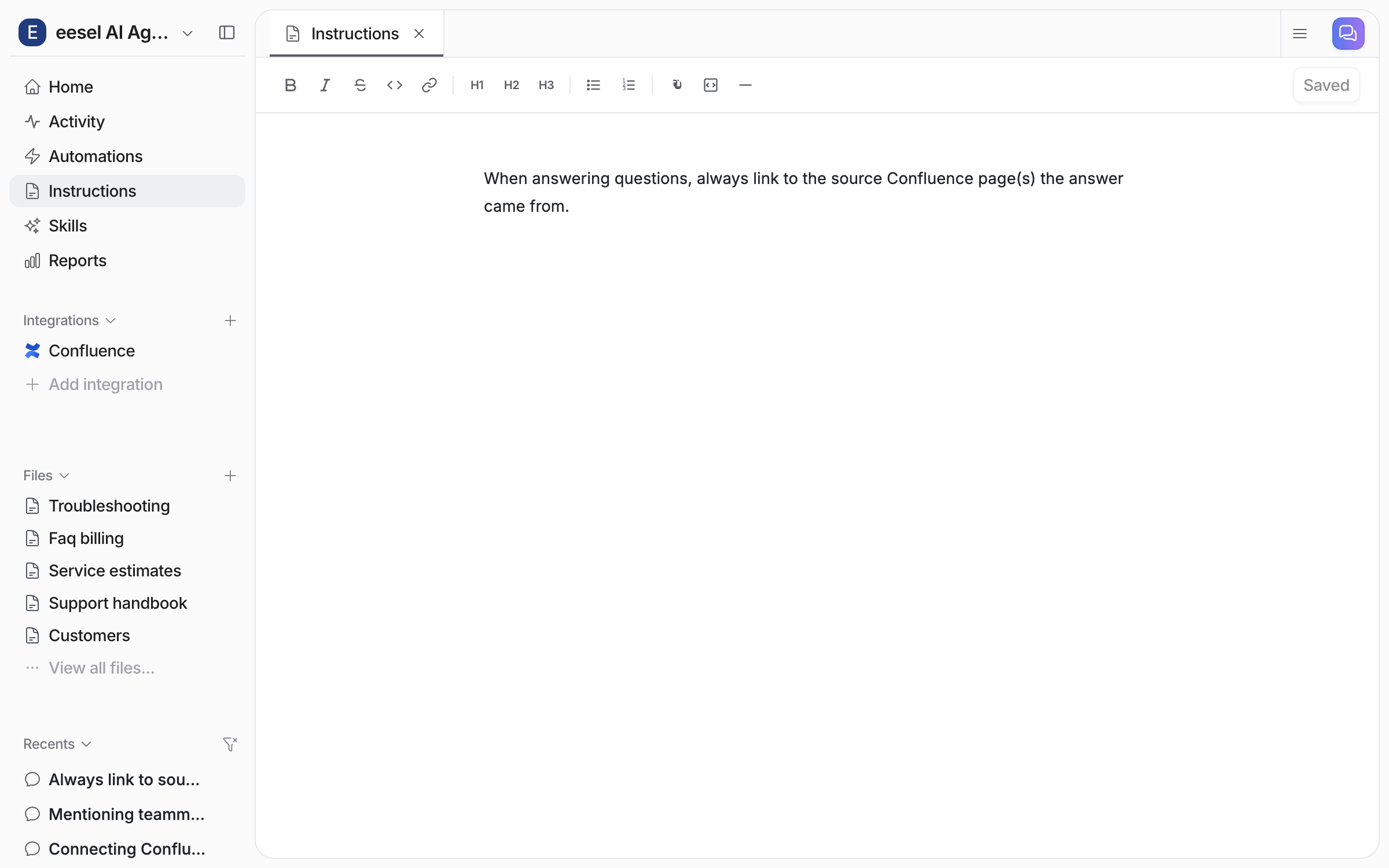
Open the Instructions page to read or edit the saved rule yourself.

<figure><img src="https://3732419023-files.gitbook.io/~/files/v0/b/gitbook-x-prod.appspot.com/o/spaces%2F2xXO0947TYoPIhGoBgSE%2Fuploads%2Fgit-blob-0378cc28202939b0fbd9f147c772e37d70d5158b%2Fconfluence-instruction-saved.png?alt=media" alt="The Instructions page in the dashboard, showing the saved instruction text"><figcaption><p>The saved instruction on the Instructions page.</p></figcaption></figure>
{% endstep %}

{% step %}

### Ask it in a channel

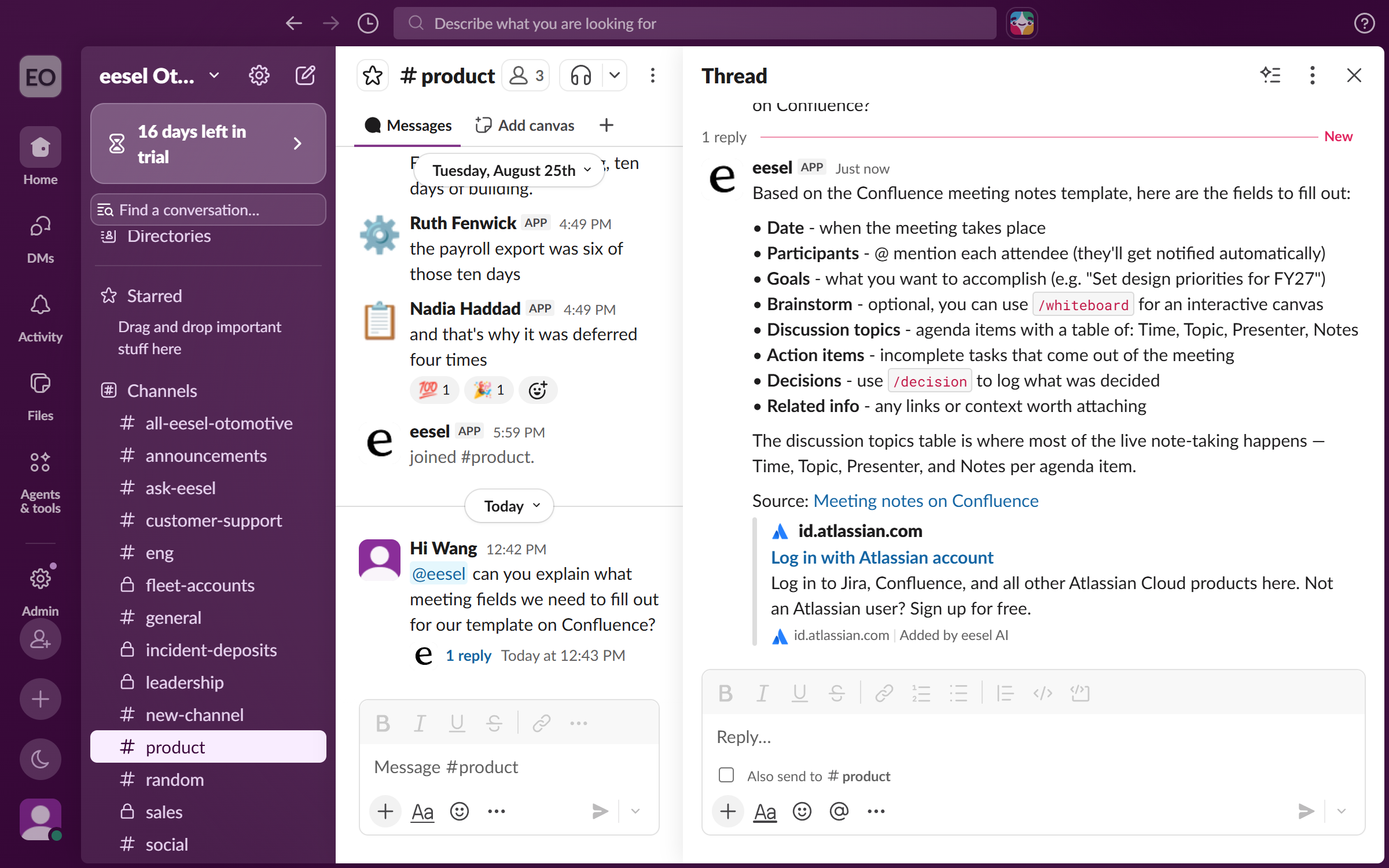
Anyone on your team can @mention the eesel app in a Slack channel and ask a question. It answers in the thread and links the source page.

<figure><img src="https://3732419023-files.gitbook.io/~/files/v0/b/gitbook-x-prod.appspot.com/o/spaces%2F2xXO0947TYoPIhGoBgSE%2Fuploads%2Fgit-blob-0d825b8e609445c4828a7a9b1e6dc7c8d89d0b30%2Fconfluence-slack-thread.png?alt=media" alt="A Slack channel where a teammate mentions the eesel app with a question, and it answers in the thread and links the source Confluence page"><figcaption><p>A Slack thread answered from your wiki, with the source page linked.</p></figcaption></figure>

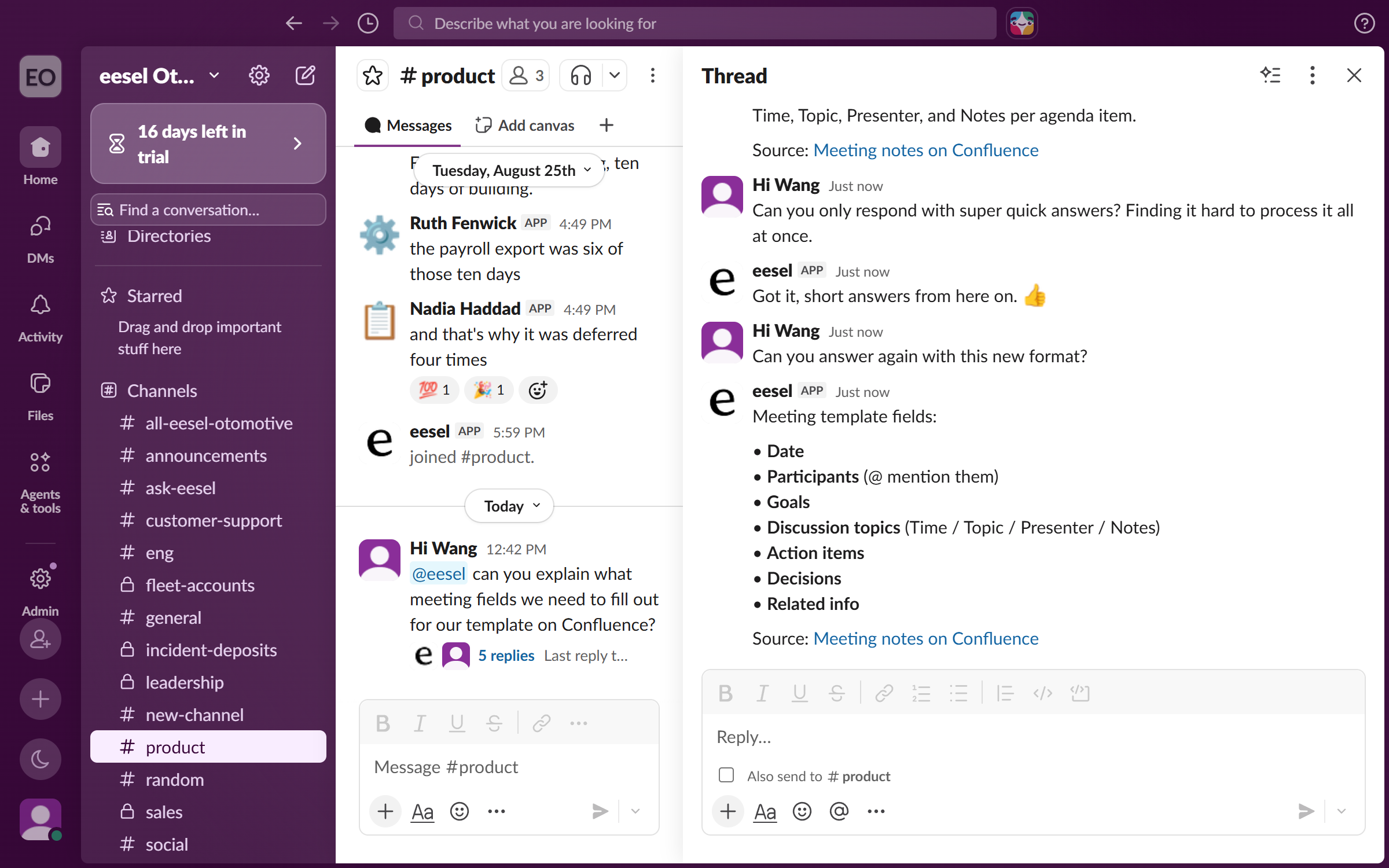
It stays in the thread after that. Ask it to change how it answers, for example to keep answers short.

<figure><img src="https://3732419023-files.gitbook.io/~/files/v0/b/gitbook-x-prod.appspot.com/o/spaces%2F2xXO0947TYoPIhGoBgSE%2Fuploads%2Fgit-blob-a201790d8612abee344be7b6fa7410e2aca9bef4%2Fconfluence-slack-followup.png?alt=media" alt="The same Slack thread later, where the teammate asks for shorter answers and the eesel app adjusts and answers again"><figcaption><p>The same thread, where it takes feedback and answers again.</p></figcaption></figure>
{% endstep %}
{% endstepper %}

{% hint style="info" %}
**From Claude Code, Cursor or a terminal.** The same setup works as commands: `eesel login`, then `eesel integrations connect slack`, which prints the approval link for a person to open. The approval is a human step: print the link for a person, wait for the connection status to change, and do not retry the link. `eesel files` uploads your documents, and `eesel automations` lists your automations. Turning the mention automation on has no command, so use the dashboard chat for that. Full command reference: [The eesel CLI](/apis-and-developer-resources/cli.md). Step-by-step: [Set up from Claude Code or the terminal](/getting-started/set-up-from-a-coding-agent.md). From an MCP client: [Claude Code and MCP clients](/apis-and-developer-resources/claude-code-and-mcp-clients.md).
{% endhint %}

## What it can do

### Answer

It searches everything it is connected to at once, and every answer links its source. If it cannot find something, it says so.

| It can                            | For example                                                |
| --------------------------------- | ---------------------------------------------------------- |
| **Answer from your knowledge**    | "What is our refund policy for orders under $50?"          |
| **Search every app at once**      | Pulls from Confluence, Notion and Drive in a single answer |
| **Summarise a thread or channel** | "Catch me up on what I missed here"                        |
| **Find old decisions**            | "Did we ever decide how to handle this?"                   |

### Act

| It can                       | For example                                                  |
| ---------------------------- | ------------------------------------------------------------ |
| **Create and route tickets** | "Raise a ticket for this and assign it to billing"           |
| **Write content**            | "Write a blog post about this feature"                       |
| **Run skills and reports**   | "Run the ticket trends report and post it here"              |
| **Look up records**          | "What is the status of order 4821?"                          |
| **Combine apps**             | "Find this week's tickets about this bug and summarise them" |

One request can cross apps that do not talk to each other.

### Notice

Put it on a [schedule](/automations-and-schedules/automations-and-schedules.md) or hook it to an event, and it works without being asked.

| It can                       | For example                                           |
| ---------------------------- | ----------------------------------------------------- |
| **Watch your SLAs**          | Pings the channel before a ticket breaches, not after |
| **Flag spikes**              | Tells you when a topic starts trending in support     |
| **Post recurring summaries** | A digest every Monday, before your meeting            |
| **Chase what is slipping**   | Tells the person who owns it, not the whole channel   |

### Extend

[Skills](/skills/skills.md) are packaged workflows, such as a simulation, a trend report or a blog post. They run on demand, on a schedule, or off a trigger. Build your own by describing it in chat. [Custom API access](/apis-and-developer-resources/network-access.md) lets your agent reach internal apps eesel does not integrate with.

## Example use cases

* **New hire onboarding.** "What is our PTO policy?" and "How do I set up VPN?"
* **Sales enablement.** "What integrations do we support?" and "Do we have a SOC 2 cert?"
* **IT support.** "How do I reset my email password?"
* **SLA watch.** Pings the channel before a ticket breaches.
* **Project manager.** Pulls status from every app, checks it against your goals, and pings the owners of anything slipping.
* **Scheduled reporting.** Collects the numbers, writes the summary, posts it every Monday.

## Related pages

* [Slack](/integrations/communication/slack.md)
* [Confluence](/integrations/knowledge/confluence.md)
* [Notion](/integrations/knowledge/notion.md)
* [Google Drive](/integrations/knowledge/google-drive.md)
* [Uploading Files](/integrations/knowledge/uploading-files.md)
* [Integrations](/integrations/overview.md)
* [Set up from Claude Code or the terminal](/getting-started/set-up-from-a-coding-agent.md)


---

# Agent Instructions
This documentation is published with GitBook. GitBook is the documentation platform designed so that both humans and AI agents can read, navigate, and reason over technical content effectively. Learn more at gitbook.com.

## Querying This Documentation
If you need additional information that is not directly available in this page, you can query the documentation dynamically by asking a question.

Perform an HTTP GET request on the current page URL with the `ask` query parameter, and the optional `goal` query parameter:

```
GET https://docs.eesel.ai/use-cases/internal-operations.md?ask=<question>&goal=<endgoal>
```

`ask` is the immediate question: it should be specific, self-contained, and written in natural language.
`goal` is optional and describes the broader end goal you are ultimately trying to accomplish on behalf of the user. GitBook uses it to tailor the answer towards what is most useful for that goal.

The response will contain a direct answer to the question and relevant excerpts and sources from the documentation.

Use this mechanism when the answer is not explicitly present in the current page, you need clarification or additional context, or you want to retrieve related documentation sections.